
Ever filled out a clunky, confusing form online and just given up? We all have. An online web form generator is the tool that prevents that from happening. It’s a way to create and publish digital forms without needing to know a single line of code.
Think of it less like a digital clipboard and more like a guided conversation, designed to collect information smoothly and efficiently. These tools are the backbone of modern lead capture, customer feedback, and streamlined data entry.
What Is an Online Web Form Generator?

At its core, an online web form generator is a software platform—usually with no-code or low-code features—that makes building interactive web forms incredibly simple. Forget wrestling with HTML and CSS. These tools give you a visual, often drag-and-drop, canvas to build sophisticated forms that look great and work perfectly.
This shift has been a game-changer for businesses. The market for this software was valued at USD 4.06 billion in 2024 and is on track to hit a massive USD 9.48 billion by 2032. Why the huge jump? Because teams in marketing, HR, and customer support need to spin up professional forms on the fly without waiting for a developer. For a deeper dive into the numbers, check out the full market analysis on Business Research Insights.
Beyond Basic Contact Forms
Modern form builders have evolved far beyond the simple "Contact Us" pages of the past. Today, they are dynamic tools that can create all sorts of interactive experiences. The real magic isn't just making data collection easier for your business, but making it genuinely engaging for the person on the other side of the screen.
A great online web form generator helps you:
- Improve the User Experience: Instead of a long, intimidating list of questions, you can create conversational flows that adapt based on the user's answers, only asking what's relevant.
- Boost Completion Rates: An intuitive, frictionless design means fewer people get frustrated and abandon your form halfway through.
- Guarantee Data Accuracy: With built-in validation rules and smart fields, you can catch common errors on the spot, ensuring the data you collect is clean and ready to use.
- Automate Your Workflows: Hook your forms up to other business tools, like your CRM or email platform, to automatically trigger actions the moment someone hits "submit."
The Power of Conversational AI
The biggest leap forward in form technology is the introduction of artificial intelligence. AI-driven forms don't just present a list of static fields; they start a dialogue. They can understand natural language, pull in information you already know about a user, and guide them through the process like a helpful assistant.
A truly effective form generator doesn't just collect information; it builds a bridge between your business and your audience. It transforms a routine task into a positive interaction, setting the stage for a stronger customer relationship from the very first click.
As businesses push to digitize every corner of their operations in 2026, knowing how to use an online web form generator is no longer a "nice-to-have" skill. It's a fundamental part of building an efficient, customer-focused organization.
Essential Features of a Modern Form Generator
The best online web form generator isn't just a simple tool for asking questions; it's a complete platform for creating smart, interactive experiences. Let's be honest, in 2026, static fields and clunky designs just don't work anymore. Today’s top-tier builders are packed with features that make creating forms a breeze for you and filling them out a smooth process for your users.
At the core of this shift is the intuitive drag-and-drop interface. This single feature has torn down the technical walls that once stood between an idea and a finished form. Now, anyone from marketing to HR can build a polished, professional form in minutes without touching a line of code. You just grab the fields you want and place them on a visual canvas. This empowers your entire team to launch campaigns and collect data without waiting on developers, which massively speeds up your projects.
Creating Personalized User Journeys
A great form feels like it was made just for the person filling it out. That's where conditional logic comes in—it's the secret sauce for creating a dynamic, responsive experience. Think of it as a "choose your own adventure" for your forms.
A user's answer to one question can trigger the form to show or hide other questions instantly. For example, on an event registration form, if someone answers "Yes" to having dietary restrictions, a new field pops up asking for details. If they say "No," that field stays hidden. This keeps the form tidy and relevant, which is a huge factor in preventing people from abandoning it halfway through.
Another absolutely critical feature is advanced field validation. This is your first line of defense against messy or incomplete data. Validation rules automatically check that information is entered in the right format—like making sure an email address looks like a real email address or a phone number has the correct number of digits. Getting clean data from the get-go saves you an incredible amount of time on cleanup later. To see how this is evolving, you can learn more about the next generation of AI form builders.
Flexibility in Form Presentation
How you ask your questions can be just as important as what you're asking. A high-quality form generator gives you options, so you can tailor the experience to your audience and your goal.
- Traditional Multi-Field Layouts: Perfect for detailed applications or internal forms where users expect to see everything at once, like a thorough job application or an onboarding packet.
- One-Question-at-a-Time Flow: This approach breaks down longer forms into small, manageable chunks. By showing just one question per screen, it reduces mental clutter and keeps users focused, which works wonders for surveys and complex sign-ups.
- Conversational Chat Interfaces: This mode turns a boring form into a friendly, two-way chat, almost like texting with a person. It's incredibly engaging, especially on mobile, and is fantastic for lead generation or customer feedback where that personal touch really matters.
By offering flexible presentation styles, a modern form generator allows you to match the user experience to the context, turning a simple data collection tool into a powerful conversion and engagement engine.
Choosing the right format is key to your success. Each style has its own strengths and is suited for different scenarios. Here’s a quick breakdown to help you decide which mode is the best fit for your next project.
Choosing the Right Form Mode for Your Goal
| Form Mode | Best For | Key Advantage | Potential Drawback |
|---|---|---|---|
| Traditional Multi-Field | Detailed applications, internal HR forms, complex order forms. | Users can see all required fields at once and plan their answers. | Can feel overwhelming or intimidating if the form is very long. |
| One-Question-at-a-Time | Lead generation, user surveys, mobile registrations, quizzes. | Reduces cognitive load and keeps users focused, improving completion rates. | May feel slow for users who want to quickly scan the entire form first. |
| Conversational Chat | Customer support intake, appointment booking, interactive feedback. | Highly engaging and personal, feels like a natural conversation. | Can feel too informal for certain professional or legal contexts. |
Ultimately, the best form builders give you the freedom to choose the mode that will get you the best results. Having this flexibility means you can optimize every interaction, whether you're gathering leads, onboarding a new hire, or just collecting feedback.
How Smarter Form Design Boosts Conversions
Let's be honest: form abandonment is the silent killer of conversions. You can craft the perfect offer and have the most amazing product, but if your web form is clunky, confusing, or just plain too long, people will leave without a second thought. Smarter form design isn't just about collecting data; it's about engineering a smooth, positive experience that gets people to the finish line.
The journey from a blank field to a submitted form is all about psychology. Simple tweaks can make a massive difference. For example, a single-column layout is much easier for our brains to process, making the form feel less intimidating. Throw in a progress bar, and you give users a sense of momentum—they can see the light at the end of the tunnel.
The Conversational AI Advantage
The biggest shift in how we think about forms today comes from conversational AI. This isn't just a fancy buzzword; it's about turning the robotic task of data entry into a helpful, two-way dialogue. An online web form generator powered by AI can create an experience that feels less like a sterile questionnaire and more like texting a capable assistant.
Think about it: a smart form can pre-fill information for a returning user, saving them from typing the same details again. It can also use conditional logic to skip irrelevant questions, respecting the user's time and streamlining the entire process. This turns a necessary hurdle into a real opportunity for engagement. To go deeper on this, check out our guide on form design best practices.
Backing Design with Data
The numbers don't lie. Web form performance is often a lot weaker than people realize. On average, only 66% of people who start a form actually complete it, leading to a dismal 1.7% conversion rate. It gets even worse on mobile, where traditional forms see a success rate of just 42.95%.
This is where AI really changes the game. Tools with natural language extraction can autofill 23% of inputs, lifting completion rates to 71%—a huge jump from the 59% seen on forms without it.
The image below can help you decide which type of form best fits what you're trying to achieve, whether that's generating leads, gathering detailed info, or just keeping users engaged.
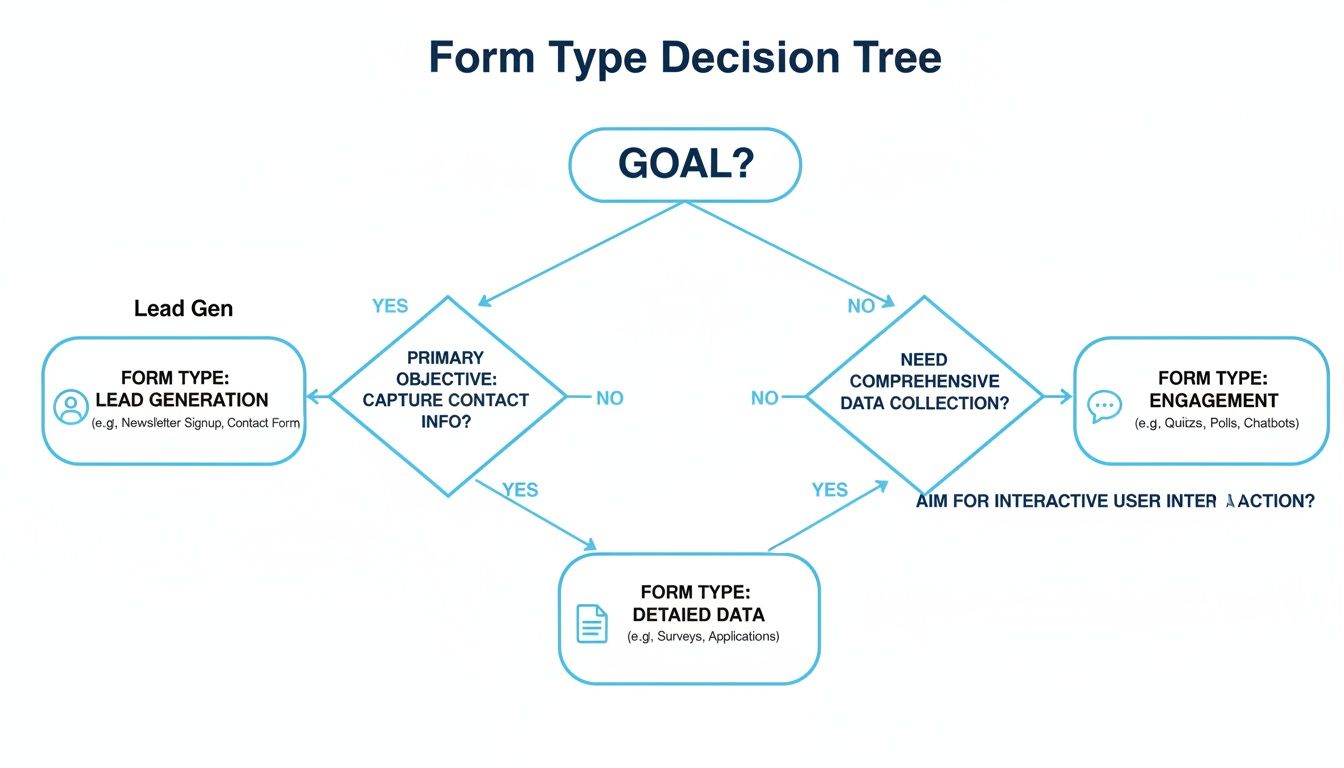
The main takeaway here is that your goal should dictate your form's structure. That's why having a flexible generator is so crucial. And if you're looking to take things a step further, exploring the world of chat bot automation can seriously supercharge your efforts.
Real-World Use Cases for Every Department
The real magic of an online form builder isn't just in the tech; it's in how it solves everyday business headaches. This isn't just about creating a simple "Contact Us" page. It’s a workhorse tool that helps every single department—from marketing and HR to customer support—work smarter and get better results.
Let's dive into some practical, real-world examples to see what I mean.
Supercharging Marketing and Lead Generation
Picture your marketing team planning a big product launch for 2026. Instead of slapping a generic "sign up for updates" field on a landing page, they build an interactive lead quiz. This isn't just about grabbing an email; it's a conversation starter.
The quiz uses conditional logic to adapt in real-time. If someone clicks "enterprise solutions," the form instantly asks about their team size and current software. Just like that, a simple sign-up becomes a powerful data-gathering tool. The sales team doesn't just get a name—they get a warm, pre-qualified lead with context.
Streamlining Human Resources
Now, let's pop over to HR, where they're often buried under a mountain of job applications. A modern form builder can completely tame that chaos right from the start.
This is way more than just a place to upload a resume. A smart application form can:
- Filter candidates automatically: Ask crucial screening questions upfront. If a candidate doesn't have a required certification, the form can politely let them know, saving recruiters dozens of hours.
- Gather structured data: By using specific fields for skills and experience, it becomes incredibly easy to compare applicants fairly.
- Improve the candidate experience: A clean, intuitive form says a lot about your company. It shows you're organized and respect the candidate's time.
The same logic works for employee onboarding. A thoughtful onboarding survey can capture feedback from new hires while their first impressions are still fresh, giving you priceless insights to make the process even better next time.
A great form builder transforms administrative tasks into strategic opportunities. It turns a job application into a talent pipeline filter and an onboarding survey into a tool for improving company culture.
Enhancing Customer Support and Feedback
Finally, let's look at the customer support team. Their world revolves around understanding customer problems and gathering useful feedback. A vague "How can we help?" box usually leads to equally vague answers, forcing a frustrating back-and-forth just to figure out the real issue.
With a smarter form builder, the support team can create a dynamic ticket submission form that actually helps the customer help them. For instance, if a user selects "Technical Issue," a new section appears asking for their browser version, device, and a screenshot.
This simple step ensures the support ticket lands with all the necessary details, allowing the team to solve problems faster and keep customers happy. It’s a small change that makes a massive difference.
How Formbot Puts These Principles into Practice

It’s one thing to talk about what makes a great online web form generator, but it’s another to see it in action. Formbot was built from the ground up to solve the common headaches that cause people to give up halfway through a form. It turns data collection from a chore into a smooth, smart conversation.
One of the biggest roadblocks for any team is the time and coding know-how needed to build a good form. Formbot's AI builder sidesteps that entire problem. Just describe what you need in plain English, and it generates a ready-to-use form for you. This no-code approach means anyone on your team can create a professional-looking form in a matter of seconds.
Making the User Experience a Priority
How you ask your questions can make or break your completion rates. That’s why Formbot offers different modes designed for specific goals, so you’re never stuck with a generic, one-size-fits-all layout.
- Chat-Based Mode: This makes the form feel like a natural text message exchange, which is a fantastic way to engage people, especially on their phones.
- Guided Mode: By presenting just one question at a time, this mode prevents overwhelm and keeps the user focused, gently guiding them from start to finish.
These carefully designed experiences have been shown to deliver higher completion rates than old-school static forms. When you make the process feel easy and intuitive for the user, you get more—and better—data.
Formbot isn't just about building forms. It’s a platform for creating better interactions. Its conversational core helps you capture the information you need while giving your users an experience they’ll actually appreciate.
A Complete Toolkit for Collecting Data
Beyond the smart builder and user-friendly designs, Formbot gives you a full ecosystem for managing your data collection efforts. It’s everything you need to launch, analyze, and improve your forms all in one place.
To help you get going fast, Formbot comes with a library of professionally designed templates for everything from lead generation to customer feedback. Real-time analytics give you immediate feedback on how your forms are performing, so you can make smart decisions quickly.
Plus, with modern encryption and built-in security, you can be confident that all the data you collect is safe. By bringing all these features together, Formbot gives any team the power to capture information more effectively as we head into 2026.
Picking the Right Online Web Form Generator
Choosing the right online form generator is a bigger deal than it might seem. This isn't just about picking a tool; it's about selecting a long-term partner that will directly impact your data quality, conversion rates, and how smoothly your business runs.
You need a platform that’s not only easy for your team to get the hang of but also provides a genuinely seamless experience for your customers, no matter what device they're using.
It’s easy to get distracted by a long list of flashy features, but the real value is in the fundamentals. Think about it: rock-solid security and compliance are absolute must-haves. You're handling sensitive data, and protecting it is non-negotiable.
Then there's the power of integrations. A great form builder should play nicely with the tools you already use every day, like your CRM or email marketing software. The goal is to automate your workflows and say goodbye to tedious manual data entry. For a head-to-head comparison, check out our guide to the best online form builders.
Evaluating Pricing and Scalability
Don't just glance at the monthly price tag—dig a little deeper. Pricing models can be tricky. Look at the details: What are the submission limits? How many forms can you actually create? Are powerful features like conditional logic locked behind a super expensive plan?
A platform that grows with you is a game-changer. For example, if you're focused on gathering feedback, you'll want to explore the best online customer feedback form template tools to see how different platforms handle that specific need.
The best pricing models let you start small and scale up without hitting frustrating walls. A solid free tier or a flexible plan shows the company is invested in your success, not just your immediate payment.
This kind of flexibility is crucial for businesses of every size. It's why Formbot has a free plan—so you can get started and expand when you’re ready. This approach makes sense, especially when you consider that the cloud-based deployment model, favored for its scalability, holds a 59.6% market share.
Ultimately, your goal for 2026 and beyond is to find a tool that doesn't just solve today's problems but is ready to handle whatever you throw at it tomorrow.
Frequently Asked Questions
Still have a few things you're wondering about? Let's clear up some of the most common questions people have when picking an online form generator.
Do I Really Need to Know How to Code?
Not at all. The whole point of modern form builders is to take coding completely out of the equation. You'll find that the best tools use intuitive drag-and-drop interfaces.
This means anyone on your team—whether they're in marketing, HR, or sales—can jump in and build a professional-looking form in minutes. No developers required.
How Do I Know My Form Data Is Actually Secure?
This is a huge deal, and something you should definitely scrutinize. Any form builder worth its salt will have security baked in from the start. Look for fundamentals like SSL encryption, which keeps data safe as it moves from the user's browser to your systems.
Good providers also use modern authentication methods to prevent unauthorized access. It’s all about protecting your data and your users' data.
Choosing a tool with robust, built-in security isn't just a technical detail; it's a fundamental part of building trust with your audience.
Can These Forms Talk to My Other Tools, Like My CRM?
Yes, and honestly, this is where the magic happens. A great form generator should connect effortlessly with the other software you already use, like your CRM or email marketing platform. This is what lets you automate your entire process.
Imagine a new form submission automatically triggering a chain of events:
- A new lead instantly appears in your CRM.
- The contact is added to the right email newsletter.
- Your sales team gets a notification in your company's chat app.
This kind of integration is what turns a simple form into a powerful workflow engine, saving you a ton of time on manual data entry.
Ready to create forms that feel more like a conversation? See how Formbot can help you capture more data with a smarter, friendlier user experience. Start for free at https://tryformbot.com.



