
An online form generator is a tool that lets you build, publish, and manage web forms without having to touch a single line of code. Think of them as a way to replace static, boring documents with dynamic, interactive experiences that feel more like a friendly conversation. The end goal? To help you gather better information, and do it much faster.
What Is An Online Form Generator
Let's try an analogy. Imagine trying to build a LEGO castle with a massive pile of random bricks and no instructions. Now, picture building that same castle using a pre-packaged kit with a step-by-step guide. That’s the difference between trying to code a form from scratch versus using a form generator online. These tools give you a simple interface, usually with drag-and-drop features, so anyone can put together a professional-looking form in minutes.
This isn't just about convenience; it's a completely different way of connecting with your audience. Instead of hitting someone with a long, intimidating wall of questions, modern form builders guide them through the process, one question at a time. It makes the whole experience feel less like an interrogation and more like a helpful chat.
To truly appreciate the shift, let's compare the old way of doing things with the new.
Old Methods vs Modern Form Generators
| Attribute | Traditional Forms (PDFs, Basic HTML) | Modern Form Generator Online |
|---|---|---|
| Creation Process | Requires coding knowledge or clunky software. | Intuitive drag-and-drop interface. No code needed. |
| User Experience | Static, often overwhelming. | Interactive, conversational, and mobile-friendly. |
| Data Quality | Prone to errors, typos, and incomplete answers. | Built-in validation and logic ensure clean, accurate data. |
| Team Dependency | Heavily reliant on IT or development teams. | Empowers marketing, HR, and sales to build their own forms. |
| Insights | Manual data entry and analysis. | Automated analytics and performance tracking. |
The table makes it clear: modern generators aren't just an upgrade—they solve fundamental problems that plagued older methods.
The Power of Conversational Data Collection
Today’s best forms are designed to feel like a back-and-forth conversation, which makes a huge difference in the user experience. This approach works especially well for people on their phones, who are already used to messaging apps.
The benefits of making this switch are pretty clear:
- Empowers Non-Technical Teams: Your marketing, sales, and HR teams can create and launch forms for their campaigns without waiting on a developer.
- Boosts Engagement and Completion: When a form is easy and interactive, people are far more likely to finish it.
- Improves Data Quality: Smart features like real-time validation and conditional logic make sure the information you get is accurate and relevant right from the start.
An online form generator isn’t just a tool for replacing paper; it’s a strategic asset for improving how you gather insights, qualify leads, and make smarter, data-driven decisions.
You can see these tools in action in all sorts of specialized fields. For example, modern client intake software for law firms relies on guided digital forms to streamline how they bring on new clients. It’s a perfect example of how these tools are built to solve very specific, real-world business challenges.
Ultimately, these platforms help businesses move faster and build stronger connections. They turn a once-annoying task into a chance to create a positive, efficient interaction with every customer, applicant, or client. By taking the technical headache out of form creation, they free up your team to focus on what really matters—using the data you've gathered, not fighting with the tool that collects it.
Why Online Form Builders Are A Billion-Dollar Industry
It might be surprising to hear, but the market for online form builders is absolutely booming. These tools have evolved far beyond the basic "contact us" widgets of the past. Today, they're essential for everything from generating leads and gathering customer feedback to automating internal workflows. They're no longer just a small part of a website; they're a core piece of the business toolkit.
The numbers back this up. A full market analysis shows the global market is projected to grow significantly. This isn't just a fleeting trend; it’s a massive shift in how businesses collect information.
Ditching Friction, Driving Conversions
So, what's behind this massive growth? It all comes down to reducing friction for the user. We've all been there: you land on a page and are hit with a wall of empty boxes to fill out. It's intimidating, especially on a phone, and it’s a huge reason people just give up and leave. A modern form generator online completely changes that dynamic.
Instead of a long, overwhelming list, the best tools present just one simple question at a time. It feels less like filling out paperwork and more like a natural, back-and-forth conversation.
By breaking the process into small, manageable steps, you lower the mental effort required from the user. They can focus on one thing at a time, which makes the entire experience feel faster and easier, leading directly to more completed forms.
This one-question-at-a-time approach is a game-changer on mobile, where scrolling through long forms is a nightmare. By building for the reality of small screens, businesses can capture leads and insights they would have otherwise lost to frustration.
Clean Data Is Good Business
The other major reason for this market explosion is the relentless pursuit of high-quality data. Inaccurate or incomplete information costs companies a fortune every year, leading to bounced emails, wasted sales calls, and skewed analytics. Online form builders help stop bad data before it ever enters your system.
Features like real-time data validation are your first line of defense. They catch common mistakes as they happen.
- Email Validation: Checks for the "@" symbol and a valid domain, catching typos on the spot.
- Phone Number Formatting: Guides users to enter a consistent format your sales team can actually use.
- Required Fields: Ensures you get the mission-critical info you need with every single submission.
This means the data flowing into your CRM and marketing platforms is clean, accurate, and ready to use. When your team can trust the information they're given, their outreach is more effective, their reports are more reliable, and the entire business runs a whole lot smoother.
Choosing The Right Form Type For Your Goal
Not all forms are built the same, and picking the right format is like choosing the right tool for a job. You wouldn't use a hammer to turn a screw, right? In the same way, using the wrong type of form can frustrate your visitors and tank your submission rates. A good form generator online gives you the flexibility to match your form's design to its real-world purpose, helping you get the best data possible.
The format you settle on directly influences how people feel and act. A long, intimidating wall of questions can make someone click away instantly. A more guided, friendly approach, on the other hand, makes them want to stick around. It all comes down to aligning the form's structure with what your audience expects and what you need to learn.
Conversational Chat Forms
Think about the difference between handing someone a long clipboard of paperwork versus just asking them a few questions in a conversation. That's the magic of a conversational chat form. It serves up questions one by one inside a familiar chat interface, making the whole thing feel more like a personal, interactive discussion.
This approach works wonders for:
- Lead Qualification: You can ask important qualifying questions in a natural, low-pressure way.
- Initial Contact: It's perfect for "Contact Us" pages or quote requests where you want to start a relationship, not an interrogation.
- Mobile Users: The chat layout is second nature on a phone, which can dramatically improve your completion rates on smaller screens.
For a closer look, we’ve put together some great examples of high-converting lead generation forms that really nail this conversational style.
Guided Single-Question Flows
The guided single-question flow is a close cousin to the chat form. It also presents just one question at a time, but usually with a more centered layout, bigger input fields, and clear "Next" buttons. This format is brilliant for breaking down long or complicated surveys into bite-sized pieces.
This step-by-step method cuts down on the mental effort required from the user. They feel a sense of progress with each question they answer, turning a form marathon into a series of easy sprints. That feeling is proven to keep people engaged.
This layout is ideal for things like job applications, in-depth feedback surveys, or any multi-step registration where you need a lot of information without scaring the user away at the start.
Traditional Multi-Field Forms
And then we have the classic traditional multi-field form. This is the one you know well—all (or most) of the questions are visible on a single page. While it might feel a bit old-school, it definitely still has its place, especially for internal tasks where people are already motivated and just want to get it done efficiently. For instance, if you're trying to collect internal feedback, you might find that designing effective staff satisfaction surveys with a straightforward layout is the most practical approach.
Stick with this format when:
- Users need to easily review or edit all their answers before hitting "submit."
- The form is for your own team, like an IT support ticket or an expense report.
- Your form is super short—think 3-4 fields—where seeing everything at once is actually simpler.
What to Look For in an Online Form Generator
When you start shopping for an online form generator, it’s easy to get overwhelmed. On the surface, they all seem to do the same thing. But when you dig a little deeper, you’ll find a handful of features that truly separate the basic tools from the ones that will actually make a difference for your team.
Think of this as your must-have checklist. These are the core capabilities that help you gather better data, save a ton of time, and create a much smoother experience for your users. Skipping any of these means you're almost certainly leaving conversions on the table.
AI-Powered Form Generation
The most significant leap forward in form building is easily AI. Instead of manually dragging and dropping every single field, you can now just tell the tool what you want in plain English. For example, you could type, “Create a contact form for my marketing agency to qualify new leads,” and the AI will spin up a complete, ready-to-go form in seconds.
This is a massive time-saver. It turns a tedious, detail-oriented task into a quick, conversational one. It’s perfect for teams that need to launch campaigns and gather feedback without getting bogged down in the mechanics of building a form from scratch.
A Library of Practical, Ready-to-Use Templates
While AI is fantastic for creating something custom, sometimes you just need a battle-tested layout for a common scenario. This is where a good template library is worth its weight in gold. A top-tier form generator online should offer a wide variety of pre-built templates for things like:
- Job applications and candidate screening
- Customer feedback and Net Promoter Score (NPS) surveys
- Event registration and RSVPs
- Lead generation and quote requests
Templates give you a rock-solid foundation. You can then tweak them to match your specific goals, knowing you’re starting with a design that’s already proven to work.
This flowchart can help you decide which form type is best for your situation, depending on what information you need and how many questions you plan to ask.
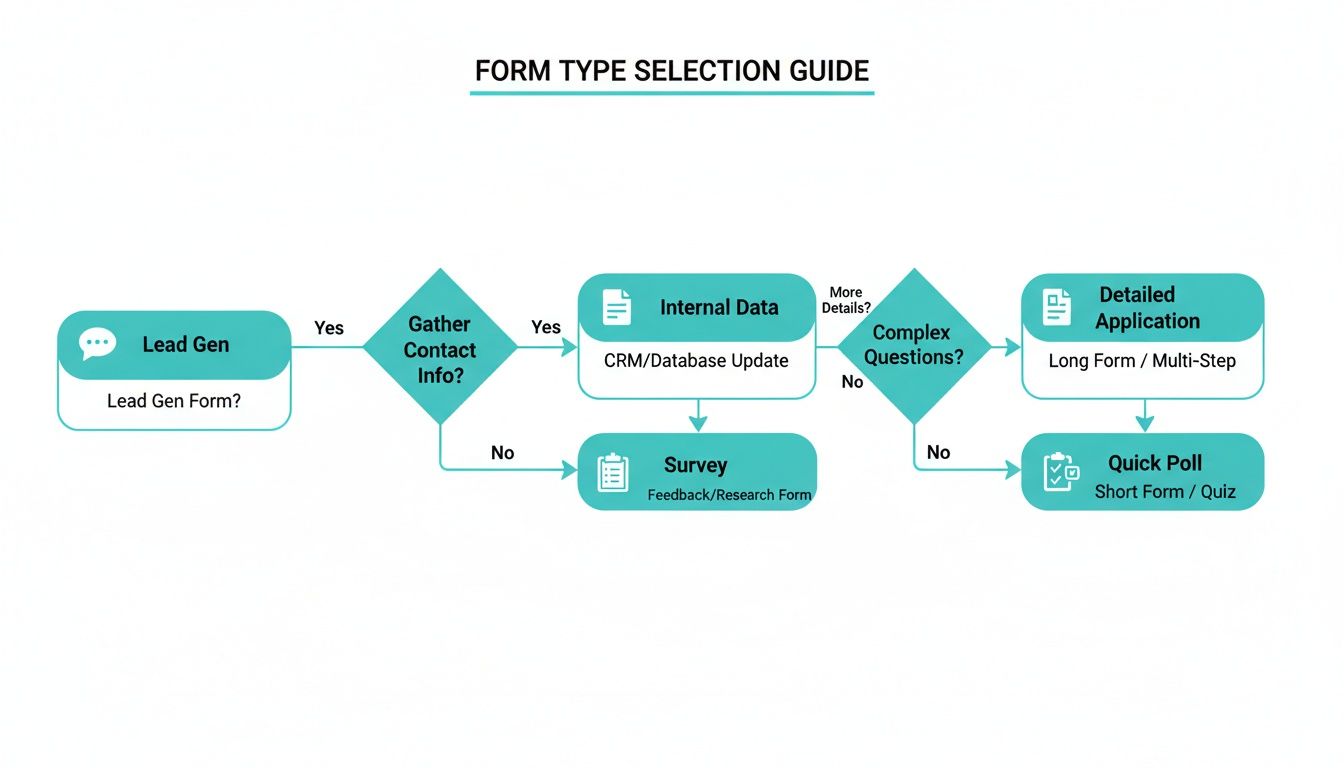
As you can see, the first step is always to clarify your main objective. That single decision influences the entire structure and feel of your form.
Deep Customization and Branding
Your form isn’t just a tool; it's a part of your brand. It absolutely has to look and feel like it belongs to you. The best form generators give you complete control over colors, fonts, logos, and even background images, creating a seamless transition from your website or email to the form itself.
When a form’s design is consistent with your brand, it builds trust and professionalism. Users are far more likely to share their information if they feel confident in who they're giving it to. This can have a direct, positive impact on your submission rates.
Powerful Analytics and Security
Finally, a great form generator doesn't just collect data—it helps you understand it and keep it safe. Look for tools with built-in analytics that let you track crucial metrics like submission numbers, completion rates, and where people are dropping off. This is the information you need to optimize your forms and get better results over time.
Security is just as important. Make sure any platform you consider offers modern data encryption to protect your users' information. This isn't just a "nice-to-have"; it's a fundamental requirement for earning your audience's trust in 2026.
To learn more about the hands-on process, check out our guide on how to create online forms that are both effective and secure.
How Formbot Delivers A Smarter Form Experience
While plenty of tools can build a basic form, Formbot was specifically designed to tackle the two biggest problems teams face with data collection: poor engagement from users and too much time spent on manual setup. It’s less about just gathering information and more about creating a smarter, more natural experience for everyone involved.
The secret sauce is a powerful AI engine at its core. Instead of dragging and dropping every single field, you can just tell Formbot what you need in plain English. For example, typing "create a registration form for a marketing webinar" prompts the form generator online to instantly build a complete, logical form for that exact purpose.
This is a huge time-saver for teams that need to get campaigns, surveys, and feedback forms out the door without getting bogged down. If you want to see just how much faster this is, check out our guide on using an AI form builder to accelerate your workflow.
A Conversational-First Design
Formbot was built with a conversational mindset. The goal is to make filling out a form feel more like a friendly chat and less like a chore. This approach works wonders on mobile devices, where users quickly abandon long, clunky forms. By presenting one question at a time in an interactive way, the process feels faster and more personal, which keeps people engaged and boosts completion rates.
Of course, a single format can't cover every situation. That's why Formbot gives you the flexibility to pick the perfect layout for the job:
- Chat Mode: This is fantastic for lead qualification and customer feedback, where you want to create a personal, engaging dialogue.
- Guided-Flow: Break down longer surveys or complex applications into easy-to-digest steps. It's perfect for keeping users on track.
- Traditional Layout: Sometimes you just need a simple, straightforward form. This layout is great for internal requests or when users prefer to see all fields at once.
Practical Features for Growing Teams
Beyond the AI and conversational design, Formbot is packed with practical tools to make your life easier. You can hit the ground running with a library of professional templates for common needs like job applications or contact forms. Plus, real-time analytics give you immediate insights into how your forms are performing, so you can make quick, data-driven decisions.
Sharing your form is as simple as sending a link. There's no need to mess around with complicated embedding or hosting. Just copy the link and share it via email, social media, or any other channel.
This user-friendly approach extends to its pricing, too. With a free plan available, Formbot gives startups and small businesses a powerful way to get started, while still offering the advanced features that larger companies need as they grow. The market for online form builder software is projected to see continued growth, and it's tools like this—combining ease of use with real power—that are leading the charge. You can read more about these market trends to get a better sense of where the industry is headed.
Frequently Asked Questions
Jumping into the world of online form builders can stir up a few questions, especially when you're trying to pick the right tool for your team. We’ve answered some of the most common ones below to give you the clarity and confidence to move forward.
Is Data Collected Through an Online Form Generator Secure?
Absolutely. Any reputable platform worth its salt puts security front and center. The best tools use modern encryption for data both in transit (as it travels from a user's browser) and at rest (while it's stored on their servers). In 2026, this isn't just a feature; it's a fundamental requirement.
Always look for a provider that’s upfront about their security and compliance certifications, especially if you're in a heavily regulated field like healthcare or finance. Taking a few minutes to review a platform's security documentation is a crucial step to make sure it meets your company's standards.
Can I Connect a Form Generator to My Existing Tools?
Yes, and you absolutely should! This is where form builders really shine. The ability to link your forms to the other apps in your tech stack is what elevates them from simple data-gathering tools into the engine for powerful workflow automation.
Most platforms offer direct, native connections to popular software, including:
- Customer Relationship Management (CRM) systems: Automatically create a new lead or update a contact in your CRM.
- Email Marketing Services: Add new sign-ups directly to your subscriber lists.
- Project Management Tools: Turn a submission into a new task or support ticket.
For anything more specialized, they usually offer webhooks or work with automation hubs like Zapier. This opens up a whole world of possibilities, letting you send data exactly where you need it and connect your forms to thousands of other apps without writing any code.
Do I Need to Know How to Code to Build a Form?
Not at all. The whole point of a form generator online is to ditch the need for code. These platforms are designed for everyone, not just developers. They rely on intuitive drag-and-drop editors and vast libraries of pre-built templates to do the heavy lifting.
Customizing your form—changing colors, adjusting fonts, adding conditional logic—is all handled through simple visual menus. This means anyone on your team, whether in marketing, HR, or sales, can create and launch a professional, high-performing form in just a few minutes.
Why Are Conversational Forms Better on Mobile Devices?
Conversational forms are a game-changer on mobile because they feel like using a messaging app—an experience everyone knows and is comfortable with. Instead of hitting users with a long, intimidating wall of fields that are a pain to tap and type into on a small screen, they ask one simple question at a time.
This approach just feels more natural on a phone. It lowers the mental effort required, reduces typos, and gives users a satisfying sense of progress as they answer each question. This is precisely why conversational forms see much higher completion rates and faster submission times on mobile, a place where traditional forms notoriously underperform.
Ready to build smarter, more engaging forms that people actually enjoy filling out? With Formbot, you can use AI to generate powerful conversational forms in seconds. Start building for free on tryformbot.com and see for yourself how a better form experience can boost your conversions.



