When we talk about HIPAA-compliant online forms, we're referring to digital tools built specifically to gather patient information while following the strict privacy and security rules laid out by the Health Insurance Portability and Accountability Act. This isn't just a standard contact form with a few extra fields; it involves specific safeguards like encryption, strict access controls, and a legally required Business Associate Agreement (BAA) to properly protect sensitive patient data.
The Real Risks of Unsecured Patient Data
It’s easy to get overwhelmed looking at the sheer volume of healthcare data breaches. While moving patient intake online has made things incredibly efficient, it's also created new vulnerabilities. Using HIPAA-compliant online forms isn't just about ticking a box on a compliance checklist—it's about maintaining patient trust and protecting your practice's integrity.

The fallout from a data breach can be devastating. In 2024 alone, healthcare data breaches exposed the private health information of over 276 million people. That staggering number really drives home why healthcare providers have to be so careful about the tools they use.
Failing to comply comes with more than just a damaged reputation. The U.S. Department of Health and Human Services' Office for Civil Rights (OCR) collected over $9.9 million in fines and settlements that same year. If you want to dig deeper into the numbers, you can find more recent data breach statistics on tellescope.com.
What HIPAA Actually Demands
At its heart, HIPAA exists to safeguard what it calls Protected Health Information (PHI). This term covers far more than just a patient's diagnosis or treatment plan. PHI is any health information that can be linked to an individual, whether it's stored on paper or electronically.
You might be surprised by what counts as PHI:
- Obvious Identifiers: Names, home addresses, birth dates, and Social Security numbers.
- Medical Records: Diagnoses, lab results, and notes on treatment.
- Contact Information: Phone numbers and email addresses, especially when tied to healthcare services.
- Digital Identifiers: Even an IP address or device ID captured when someone fills out your form can be considered PHI.
- Photographic Images: Full-face photos or any other comparable images.
The moment you collect any of these through an online form, you are officially handling PHI. That means your form, the software it runs on, and your data storage methods all have to meet HIPAA's strict security standards.
The Non-Negotiable Business Associate Agreement
This is one of the most important—and most frequently overlooked—pieces of the puzzle. If you use a third-party tool like an online form builder, that company becomes what HIPAA calls a "business associate." Why? Because they are creating, receiving, or transmitting PHI on your behalf.
A Business Associate Agreement (BAA) is a legal contract. It ensures your vendor is just as responsible for protecting patient data as you are. If your form provider won't sign a BAA, you are not HIPAA compliant. It's that simple.
This isn't just a technicality; it's a make-or-break requirement. A BAA contractually binds your vendor to implement all the necessary safeguards. Choosing a provider that refuses to sign one is a direct violation and puts your entire organization in a precarious position, both legally and financially. It’s a foundational business decision that directly impacts the trust your patients have in you.
What Makes an Online Form Genuinely HIPAA Compliant?
When you’re handling patient data online, claiming HIPAA compliance is easy, but proving it is another story. A genuinely compliant form isn't just about a badge on a website; it’s a carefully constructed system of technical and administrative safeguards. These elements have to work in concert to protect Protected Health Information (PHI) at every single touchpoint, from the second a patient starts typing to the moment that data is securely archived or destroyed.
Let's get into the nuts and bolts of what separates a standard web form from one that actually meets HIPAA's demanding standards.
Encryption Must Be Non-Negotiable
The absolute bedrock of a secure online form is end-to-end encryption. This isn't just one thing; it's a two-part security promise that shields data whether it's moving or sitting still.
Encryption in Transit: This is what protects data as it travels from a patient's web browser to your form provider's server. You’ll recognize this as HTTPS, secured by SSL/TLS. Without it, you're essentially sending sensitive health details on a postcard for anyone to read.
Encryption at Rest: Once that data arrives safely, it can't just sit there in plain text. It needs to be encrypted on the server. That way, even if someone managed to physically access the server, the patient data would be nothing but unreadable, scrambled code without the proper decryption keys.
A truly HIPAA-compliant platform doesn’t offer these as premium features or add-ons. They are the default, baseline setting. Anything less is a non-starter.
Expert Insight: If a form builder can't explicitly guarantee both encryption in transit and encryption at rest (look for standards like AES 256-bit), you should walk away. It's the most basic, non-negotiable technical requirement.
Access Controls and the "Minimum Necessary" Rule
One of HIPAA's core tenets is the “minimum necessary” rule, which simply means people should only see the PHI they absolutely need to do their jobs. A billing specialist, for instance, has no reason to see a patient’s detailed clinical history.
A compliant form platform enforces this principle with granular user access controls. This isn't just about a simple password; it's about creating a structured environment where information is properly siloed.
Look for features like:
- Role-Based Permissions: The ability to create specific roles—like "Administrator," "Clinician," or "Front Desk"—each with its own set of permissions for viewing or editing submissions.
- Strong User Authentication: Every user should have a unique login, a strong password, and ideally, be required to use multi-factor authentication (MFA).
- Secure Backend Access: All entry points for viewing submitted data must be protected and logged.
These controls turn your form's inbox from a free-for-all into a secure vault where every piece of information is on a need-to-know basis.
You Can’t Comply Without Audit Trails
Imagine a patient's record is changed, but you have no idea who did it or when. That’s a compliance nightmare. This is exactly why a comprehensive audit trail (or audit log) is so critical.
An audit trail is an immutable, chronological record of every single action taken on a piece of PHI within the system.
A compliant form builder has to track and log everything. It should be able to tell you:
| Action | Who | When |
|---|---|---|
| Viewed PHI | User 'jane.doe' | 2024-10-26 at 10:15 AM |
| Exported Data | User 'john.smith' | 2024-10-26 at 11:30 AM |
| Deleted Submission | User 'admin' | 2024-10-27 at 09:05 AM |
This level of detail is your best friend during a security audit or, worse, a breach investigation. It gives you the power to prove you have full visibility and control over your patients' data.
The BAA: The Legal Glue Holding It All Together
HIPAA compliance doesn't end when you've collected the data; it extends through the entire data lifecycle, including secure disposal. A compliant platform must have a clear process for permanently destroying PHI when it's no longer needed, preventing old data from becoming a future liability.
But what legally binds all these technical and administrative safeguards together? The Business Associate Agreement (BAA).
This is the contract that legally obligates your form vendor to uphold their share of HIPAA's security and privacy rules. Without a signed BAA from your provider, all the fancy security features in the world are meaningless from a legal compliance standpoint. It’s the formal handshake that confirms your vendor is a true partner in protecting patient data.
Building these forms correctly from scratch takes a ton of technical know-how. This is where leaning on pre-built, compliant templates can be a game-changer. For example, using a proven telemedicine consent form ensures you’re capturing the necessary patient authorizations right from the start, without having to reinvent a compliant wheel.
How to Build Your First Compliant Form
Moving from the theory of HIPAA to the practical reality of building a form is where the rubber really meets the road. Getting your first HIPAA-compliant online form up and running can feel intimidating, but it’s mostly about a series of deliberate, security-first decisions. Honestly, it’s less about being a coding genius and more about making smart choices with the right tools.
This whole process starts long before you ever drag and drop your first form field. It begins with picking a platform that was built with security in its DNA.
Start with a Compliant Platform and a BAA
Let's be clear: the single most important choice you'll make is your form-building software. If a vendor can't—or won't—sign a Business Associate Agreement (BAA), walk away. It's a non-starter. This legal contract is the absolute foundation of your compliance, making your vendor a partner in protecting patient health information (PHI).
For a deeper dive into what to look for, check out this guide on choosing the right HIPAA compliant receptionist services platforms. It offers some great perspectives on how to vet potential partners for your practice's unique needs.
Once that BAA is signed, you have the legal framework you need to start building.
Configure User Roles and Access Controls
HIPAA’s “minimum necessary” principle isn’t a gentle suggestion; it’s a direct order. Your team should only be able to see the specific patient information they need to do their jobs. A truly compliant platform will give you fine-grained control over who can see and do what.
Think about a typical clinic workflow:
- Front Desk Staff: They probably need to see patient names and appointment times, but they definitely shouldn't be looking at detailed medical histories.
- Billing Specialists: They require access to insurance details and billing codes, not sensitive clinical notes.
- Clinicians: Your doctors and nurses, of course, need full access to provide proper care.
By setting up distinct user roles, you’re essentially building digital walls that prevent unauthorized access before it happens. It's a basic administrative safeguard that dramatically shrinks your risk. Every team member needs their own unique login, and you should enable multi-factor authentication wherever you can.
Key Takeaway: Role-based access is one of the single most effective ways to prevent accidental data breaches. It keeps PHI compartmentalized so a slip-up in one area doesn't put your entire patient database at risk.
Design the Form with Purpose and Consent
Okay, now let's get to the form itself. One of the most common mistakes is creating a massive, all-in-one form that asks for way too much information upfront. This not only frustrates patients but also ratchets up your compliance risk.
Let's use a new patient intake form as an example. Instead of one monster document, what do you truly need for that first visit?
- Key Demographics: Name, date of birth, contact info.
- Insurance Details: Policy and provider numbers.
- Reason for Visit: A quick summary for the clinician.
- Critical Medical Info: Major allergies, current medications.
You can always get more details during the actual appointment. The online form's job is to streamline check-in, not capture a person's entire life story. Many practices get a head start by using pre-built templates. For instance, a solid patient intake form template gives you a compliant structure that you can then tweak for your own needs.
And don't forget this crucial piece: every single form that collects PHI must have clear consent language. You need a statement that plainly tells the patient they're submitting sensitive health data and gives your practice permission to use it for their care.
Enable Critical Security Features
Finally, you can't just assume the security features are working. You have to actively turn them on and check your settings. Compliance isn't a "set it and forget it" deal.
This simple workflow shows the core of what you're trying to do: encrypt the data, control who sees it, and audit all activity.
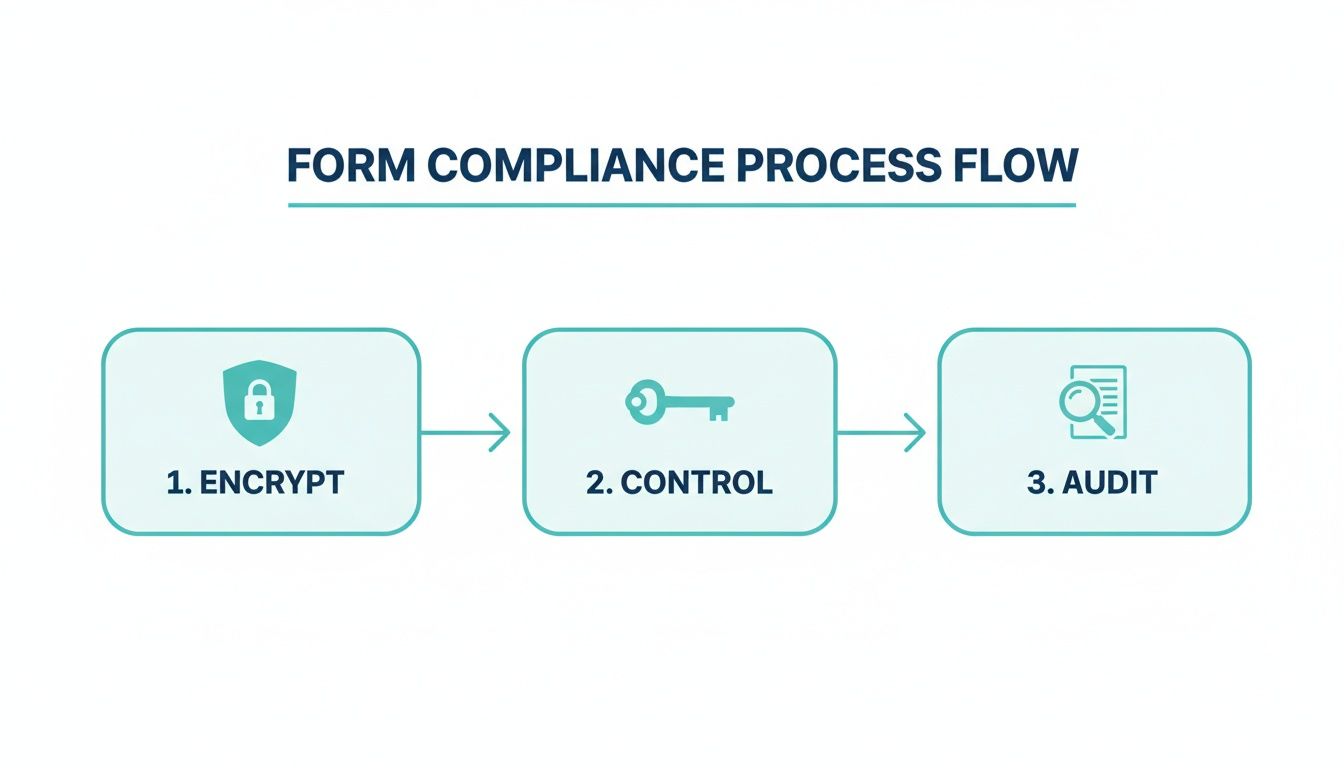
This illustrates that compliance is an active, ongoing strategy, not just a switch you flip on.
Here are the non-negotiable settings you need to verify:
- Confirm End-to-End Encryption: Make sure data is encrypted both "in transit" (as it travels over the internet via HTTPS) and "at rest" (while sitting on the server). Any reputable, HIPAA-ready service does this by default.
- Set Up Secure Storage: Know where your form data lives. The platform must use secure, compliant cloud infrastructure.
- Activate Audit Logging: Turn on your audit trails. This feature is your digital detective, logging every single time PHI is viewed, changed, or downloaded. It’s essential for accountability.
Improving Patient Experience Without Risking Security
There's a stubborn myth in healthcare that any tool labeled "HIPAA compliant" has to be clunky, outdated, and a pain to use. The thinking goes that strong security and a great user experience are on opposite teams. That just isn't true anymore. Modern, HIPAA-compliant online forms are built to do both, turning a routine administrative task into a positive first impression for your patients.
This isn't just about a pretty interface; it's about fundamentally improving how patients engage with your practice before they even set foot in the office. The right technology can make the intake process feel less like a chore and more like a simple, guided conversation.

The Power of Conversational Interfaces
Think about the traditional online form—it's often a wall of empty boxes. That's a daunting sight, especially on a small mobile screen. This old-school design is a major reason for high abandonment rates, which means your staff ends up chasing down incomplete information anyway. A much better approach flips this model on its head by using a conversational, one-question-at-a-time interface.
This method feels more like a friendly text exchange than filling out paperwork. By showing only one field at a time, you reduce the cognitive load on the user, making the whole process feel faster and far more manageable.
The impact on form completion can be significant. When forms are easy to complete, especially on mobile devices, patients are more likely to finish them. This simple design choice can transform long, intimidating documents like new patient intakes or complex mental health assessments into intuitive, step-by-step processes.
From Better UX to Better Business Outcomes
Improving the patient experience with user-friendly forms directly and measurably boosts your practice's operational efficiency. Every single form completed online is a win for your front desk staff, saving them time and cutting down on the manual workload that leads to burnout.
Consider the ripple effects of a higher form completion rate:
- Less Administrative Chase: When patients finish their forms accurately beforehand, your staff isn't stuck making phone calls or sending reminders to track down missing details.
- Fewer Data Entry Errors: Digital submissions get rid of the guesswork of deciphering messy handwriting, leading to more accurate patient records from the get-go.
- A Smoother Check-In: With paperwork already handled, the check-in experience is faster and less stressful for everyone, freeing up time for more meaningful patient interactions.
The connection between user experience and your bottom line is undeniable. Adopting a platform that is both secure and thoughtfully designed is a smart business decision. It shows you're committed to patient-centered care while also creating a more efficient, profitable operation. You can learn more about optimizing this initial touchpoint in our article on creating better patient registration forms.
The Business Case: A great patient experience starts long before the appointment. By making the intake process easy and intuitive, you not only increase completion rates but also reduce front desk overtime and improve data accuracy—all of which contribute to a healthier bottom line.
Choosing a platform with a focus on conversational design means you don’t have to sacrifice patient satisfaction for security. It's about recognizing that in modern healthcare, a positive user experience is a critical part of the overall care journey. By meeting patients where they are—which is usually on their phones—you make compliance feel effortless.
Common Compliance Mistakes to Avoid
Even with the best intentions, it's surprisingly easy to misstep when it comes to HIPAA and online forms. Countless healthcare practices get tripped up by simple oversights that expose them to huge risks. These aren't usually malicious acts, but small errors made when adopting new digital tools without a full grasp of the compliance implications.
Think of the following as a field guide to the most common traps. Spotting them early can save you from a world of trouble down the line.
Partnering with a Vendor Without a BAA
This is the big one. If you remember nothing else, remember this: if a vendor touches Protected Health Information (PHI) on your behalf, they must sign a Business Associate Agreement (BAA). Period.
You might find a fantastic form builder that's simple, cheap, and has all the bells and whistles. But if that company won't sign a BAA, you cannot legally use them for anything involving PHI. It’s a dealbreaker, and it’s non-negotiable.
A BAA is the legally binding contract that holds your vendor to the same strict data protection standards you are. Without it, you have zero legal assurance they're safeguarding the patient data they handle for you. Using a popular survey tool that doesn't offer a BAA for patient intake is a direct violation of HIPAA from the very first submission.
Sending PHI Over Unencrypted Email
Here’s another mistake that happens all the time: form data gets sent directly to a standard email inbox. Many form tools are set up this way by default. The front desk gets an email with a PDF of the patient's intake form attached, full of sensitive medical history.
That's a massive problem. Unless your organization uses a specialized, end-to-end encrypted email service (and most don't), that email is flying across the internet like a postcard. Anyone could potentially intercept and read it.
Crucial Takeaway: A compliant workflow never involves emailing raw PHI to a standard inbox. Instead, your team should receive a simple notification and then be required to log in to a secure, access-controlled platform to view the actual form submission.
Setting Weak or Non-Existent Access Controls
HIPAA's "minimum necessary" rule is pretty straightforward: people should only see the PHI they absolutely need to do their jobs. Yet, it's common practice to give everyone—from the office manager to the marketing intern—the same admin-level access to the form submission database.
This creates needless risk. Your marketing person might need to know how many people filled out the "New Patient" form, but they should never see the answers inside it. A billing specialist doesn't need to read a patient's detailed clinical notes.
This is where role-based access controls are so important. You need to set up distinct user accounts with permissions tied to their specific job function. Each person gets a unique login, and you should always enable multi-factor authentication to add another layer of security against stolen passwords.
Neglecting Data Backup and Disposal Plans
Your responsibility for PHI doesn't stop after you've collected it. You have to manage its entire lifecycle, from creation to secure disposal. Two ends of this spectrum are often ignored:
- No Backup Plan: What's your plan if your form provider's server crashes and all your new patient data is lost? It’s not just an IT headache; it's a potential patient care crisis and a serious compliance failure.
- No Disposal Policy: On the flip side, hoarding data forever is also a liability. HIPAA requires you to have a policy for getting rid of PHI when it's no longer needed for its original purpose.
A compliant system gives you control over both. Look for tools that offer secure, automated backups and allow you to set clear data retention policies, so you can securely and permanently delete old submissions. Failing to plan for both backup and disposal leaves your practice wide open to risk.
Your Questions on HIPAA Forms Answered
Stepping into the world of HIPAA compliance can feel like walking through a minefield, especially when you're bringing new digital tools into your practice. Countless practices grapple with the same questions as they move to online forms. Let's cut through the noise and get you some clear, straightforward answers.
What Really Makes an Online Form HIPAA Compliant?
This is the big one. A form isn't compliant just because a company slaps a label on it. True HIPAA compliance is about the entire system protecting the data, not just one feature. It's a combination of robust technical security, strict internal rules, and a crucial legal contract.
Think of it as a security chain with several essential links:
- End-to-End Encryption: The data has to be scrambled and unreadable from the moment a patient hits "submit" (in transit) all the way to where it's stored on a server (at rest).
- Access Controls: Not just anyone should be able to see patient data. Compliance demands that only authorized staff with unique, individual logins can access submitted Protected Health Information (PHI).
- Audit Trails: The system has to keep a detailed log of every single touchpoint with patient data. Who viewed it? When? Was it exported? This creates accountability.
- A Signed Business Associate Agreement (BAA): This is the absolute deal-breaker. It’s a legal contract that makes your form provider responsible for protecting PHI according to HIPAA rules. No BAA, no compliance. Period.
Can I Just Use Something Like Google Forms to Collect Patient Information?
This question comes up all the time, and while the answer has some nuance, for most healthcare providers, it’s a firm no. It's a classic case of "can" vs. "should." While Google does offer a BAA for some of its paid Workspace plans, making it possible to configure their tools for HIPAA, it's a massive undertaking. The default settings on a standard Google Form are absolutely not compliant.
The responsibility falls entirely on you to lock everything down. You have to configure every security setting, triple-check all the sharing permissions, and ensure the data is managed perfectly. One accidental "share with link" click could expose sensitive patient data and trigger a major breach. For the vast majority of practices, choosing a dedicated HIPAA-compliant form builder is a much safer and more reliable path.
Why Is a BAA So Important for Any Vendor I Use?
The Business Associate Agreement (BAA) is the legal backbone of your relationship with any third-party service that handles PHI. It’s the contract that officially obligates your form provider to safeguard that data with the same rigor you do.
Here’s why it’s non-negotiable: HIPAA makes you, the covered entity, the ultimate guardian of patient data. When you pass that data to a vendor—like a form builder—the BAA legally extends that responsibility to them. If they have a security breach, the BAA ensures they are held accountable, too. Using any vendor to handle PHI without a signed BAA in place is a direct violation of HIPAA.
We're a Small Practice. Where Do We Even Start?
If you're just starting to digitize your patient intake, the single most important first step you can take is to choose a vendor that is built specifically for HIPAA-compliant data collection. Don't waste your time trying to patch together a solution with a tool that wasn't designed for healthcare.
Start by looking for form builders that clearly state their commitment to HIPAA and make it easy to sign a BAA. Getting this foundational piece right from the beginning will save you from a world of headaches down the road. As you map out your strategy, you might find this comprehensive guide to HIPAA compliance to be a huge help.
Ready to create secure, conversational, and effective online forms? Formbot offers a HIPAA-ready platform to help you build experiences that your patients will love. Describe your form, and let our AI do the rest. Discover the future of data collection at tryformbot.com.



