
When you start comparing survey software, you quickly run into a hard truth: most traditional survey tools are great at collecting data but terrible at engaging the people who give it to you. The real difference between old-school platforms and modern ones is the experience. We're moving away from static, long-winded forms and toward dynamic, conversational interactions that actually respect a person's time.
Why Traditional Surveys Just Don't Cut It Anymore
The way we gather information is at a turning point. For a long time, standard multi-page forms were the go-to for customer feedback, market research, and lead capture. That model made sense when everyone was on a desktop with plenty of time to spare. But that world is long gone, and the cracks in those old methods are now impossible to ignore.
The biggest problem is a fundamental mismatch between the technology and how we live now. So much of our online time is on a phone, where filling out long forms is a nightmare. We're all used to the fast, easy back-and-forth of messaging apps. Pinching, zooming, and scrolling through a dozen fields just feels clunky and frustrating. That friction is a huge reason why so many people give up halfway through.

User Engagement Has Fallen Off a Cliff
Static forms are lazy. They treat every single person the same, asking the same questions in the same order, no matter how they've answered before. This "one-size-fits-all" mentality means people are constantly hit with irrelevant questions, making the whole thing feel tedious and impersonal. The result? People either bail on the survey or just click through as fast as possible to be done with it, giving you garbage data.
It's not just about making things look pretty. It's about respecting the user's attention. When a survey feels more like an interrogation than a conversation, engagement tanks, and the quality of your data goes down with it.
This is exactly why a proper survey software comparison is so important. Businesses today need tools built for the modern user, not the user of a decade ago.
The Big Flaws of Old-School Survey Tools
Let's be blunt: traditional platforms are struggling to keep up. Their limitations put up major roadblocks to getting good data, forcing you into a corner where you have to sacrifice either user experience or data quality.
Here’s where they really fall short:
- Terrible Mobile Experience: Most classic survey builders weren't made for small screens. They were an afterthought, which is why abandonment rates on phones and tablets are sky-high.
- Rigid Questioning: Some might have basic skip logic, but they can't adapt on the fly to what a user is telling them. This creates a stiff, impersonal journey that often misses the mark.
- Dismal Completion Rates: It’s a simple formula: bad design + too many questions + zero engagement = fewer completed surveys. This directly harms the reliability of your entire dataset.
At the end of the day, these platforms fail to grasp that a survey is a conversation. It should be an intuitive, responsive, and efficient exchange. By sticking to an outdated model, they create a poor experience that completely undermines the goal of collecting accurate, insightful information. The next wave of survey software was designed to fix this exact problem.
Establishing Your Core Evaluation Criteria
Before you even start looking at different survey tools, you need a game plan. A smart survey software comparison isn't just about ticking off features on a list; it’s about figuring out what actually moves the needle for your response rates and data quality. Without your own set of criteria, you’ll get lost in flashy features that you'll never actually use.
This is more important than ever. The survey software market is exploding and expected to hit USD 8.55 billion by 2030, with cloud-based tools making up over 80% of that. More choices mean it's easier to pick the wrong tool if you aren't crystal clear on what you need. You can read more about these market trends and projections.
So, before we get into the nitty-gritty comparisons, let's nail down what really matters.
User Experience and Completion Rates
Honestly, this is the most important factor. If taking your survey is a pain, people will bail. A clunky, confusing, or long-winded survey is a one-way ticket to high abandonment rates and skewed data.
Think about it from the respondent's perspective. Is the interface clean and simple, both on a big screen and on their phone? Does it feed them one question at a time to keep them from feeling overwhelmed? These aren't just nice-to-haves; they are fundamental to getting people to the finish line. A tool that feels more like a quick chat than a formal interrogation will win every time.
Mobile and Conversational Capabilities
Let's face it: most people will probably take your survey on their phone. That means a "mobile-first" design isn't optional. You need a platform that feels built for a small screen, not just one that awkwardly shrinks a desktop page.
A conversational, chat-like interface is a huge advantage. When a survey feels like texting a friend, completion rates go up. It’s familiar, it’s fast, and it feels personal.
This approach works wonders for reaching younger audiences or anyone who lives on their phone. Turning a boring form into a simple back-and-forth conversation can completely change the game.
Customization and Template Quality
Your survey is a reflection of your brand. The basics, like customizing colors and fonts, are key for building trust. But don't stop there—real customization is about more than just looking pretty.
Dig a little deeper and ask these questions:
- Question Logic: Can you build smart, branching paths? No one wants to answer questions that don't apply to them. Good logic keeps the experience relevant.
- Template Depth: Does the tool come with high-quality, pre-built templates for things like NPS, customer feedback, or market research? A good template library saves a ton of time.
- Field Types: Can you go beyond simple multiple-choice? You'll need options for ratings, file uploads, and date pickers to get the rich data you’re after. If you need some ideas, check out these effective survey question examples.
Analytics and Reporting
Getting the data is just the first step. The real value comes from making sense of it. When you're looking at different tools, their reporting and analytics features should be a top priority. A great guide on how to analyze survey data can show you exactly what to look for here.
At a minimum, your tool needs a dashboard that shows you results as they come in. Look for the ability to generate reports automatically, filter your data to find specific insights, and easily export everything to Excel or Google Sheets. The goal is to get from raw numbers to smart decisions without a headache.
Comparing the Top Survey Software Platforms
Alright, let's get into a real-world comparison of the leading survey software. We've already laid out the criteria for what makes a good tool, but now it's time to see how the major players stack up. This isn't just a feature checklist; it's about understanding which platform fits your specific needs, whether you're after massive quantitative data or deep, personal feedback.
The market for these tools is exploding. It's not just a gut feeling; the numbers back it up, showing a clear trend toward cloud-based solutions and significant overall growth.
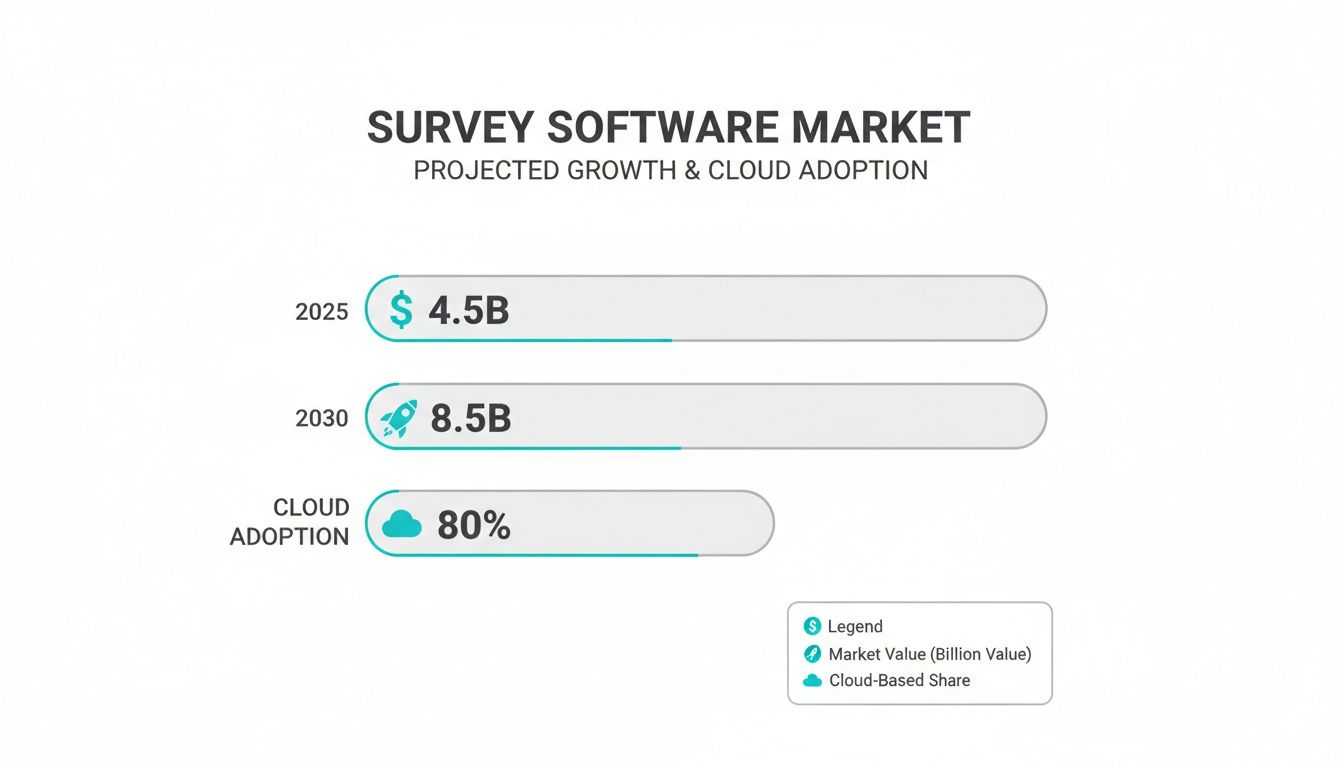
This isn't just noise. A market racing toward $8.5 billion by 2030 shows how critical collecting good data has become for any serious business.
The Old Guard: SurveyMonkey and Typeform
When you think of surveys, SurveyMonkey is probably the first name that pops into your head. It's the industry giant for a reason. Its biggest strengths are its massive question bank and the unique ability to buy responses directly from specific demographics. If your goal is broad-stroke market research and you have the budget for a large, targeted panel, SurveyMonkey is a powerhouse.
Then you have Typeform. They carved out their niche by focusing on design and user experience. Instead of a long, intimidating form, Typeform presents one question at a time, making the whole process feel less like a chore. Their visual logic builder is also a game-changer, helping you map out complex survey paths without getting tangled in a web of "if-then" conditions.
Still, both of these platforms are fundamentally rooted in the traditional idea of a form. They've polished the experience, but at the end of the day, your users are still just filling out a questionnaire.
The Big Difference: It all comes down to the interaction. Traditional tools make filling out a form more pleasant. Conversational platforms get rid of the form altogether and replace it with a natural, chat-like dialogue. This is a crucial distinction that has a huge impact on completion rates, especially on mobile.
The New Wave: Formbot and SurveySparrow
This is where the next evolution of survey tools is happening. Platforms like Formbot and SurveySparrow are built on a simple but powerful idea: a survey should feel like a conversation.
SurveySparrow excels at creating chatbot-style surveys that mimic a live chat. This makes the interaction feel more casual and engaging, which works wonders for things like customer service feedback or quick employee pulse checks. It gives you plenty of design flexibility, with custom buttons and scales that fit right into its chat interface.
Formbot pushes this conversational concept even further by weaving AI into the entire process. It's not just about putting questions in chat bubbles. With Formbot, you can generate a complete, intelligent survey from a single text prompt. The conversational engine is also designed to understand natural language, making the back-and-forth feel genuinely authentic, not robotic.
A Real-World Example
Let's say you're gathering feedback on a new product feature.
- The Old Way: You'd build a form with some multiple-choice questions and a generic text box for "additional comments."
- The Formbot Way: You can kick off the chat with, "What did you think of the new reporting dashboard?" The user responds naturally, and the AI can ask smart follow-up questions based on their sentiment or keywords. This creates a dynamic feedback loop that uncovers insights a static form would miss.
This approach doesn't just get you better qualitative data; it gets you more data, period. The experience is faster for the user and feels a lot less like work.
Feature Breakdown Across Top Survey Platforms
To make this even clearer, let's put these tools side-by-side. The table below isn't about every single feature but focuses on the modern capabilities that truly separate the platforms.
| Feature | Formbot | Competitor A (Traditional - e.g., SurveyMonkey) | Competitor B (Aesthetic - e.g., Typeform) |
|---|---|---|---|
| Conversational AI | Core to the product; AI-driven conversations | Limited to basic logic | One-question-at-a-time flow, not AI-driven |
| Mobile-First Design | Native chat UI feels natural on mobile | Responsive design, but still a web form | Visually appealing, but can be slow on mobile |
| Intelligent Routing | AI-powered follow-ups based on user input | Pre-defined conditional logic (skip logic) | Visual logic builder for pre-set paths |
| Integration Ecosystem | Robust, with deep connections to CRMs & APIs | Extensive marketplace, often paid add-ons | Strong, focused on design & marketing tools |
As you can see, the difference is in the philosophy. Traditional tools add features onto a form, while conversational platforms start with the interaction itself.
This space is not only growing—it's incredibly competitive. North America currently holds a 32.0% global share, and the U.S. market alone is projected to hit $2.4 billion in 2025 across 433 competing businesses. While enterprise solutions dominate with a 62.1% share, the freemium model is making powerful tools accessible to everyone. You can find more data on the competitive survey software market.
So, Which Platform Should You Choose?
The right choice comes down to your specific goal. There’s no single "best" tool, only the best tool for the job at hand.
Choose a traditional platform (SurveyMonkey, Typeform) if:
- You need large-scale, quantitative data and plan to buy responses from a panel.
- Your main priority is brand aesthetics, and a beautiful, simple form is all you need.
- Your audience is mostly on desktop and is used to filling out classic online forms.
Choose a conversational platform (Formbot) if:
- Boosting completion rates is your number one goal, especially for a mobile-heavy audience.
- You need rich, qualitative feedback and want to create a more personal, engaging experience.
- You want to use AI to build and adapt your surveys quickly without needing to be a tech expert.
Ultimately, the best survey software is the one that gets out of the user's way while delivering the actionable insights you need. For more and more teams, that means shifting away from static forms and toward real conversations.
How Conversational AI Is Redefining Data Collection
Let's be honest: data collection has traditionally been a bit of a one-way street. Businesses ask, and users answer. It works, but it’s not exactly engaging. Now, artificial intelligence is flipping that script, turning a dull exchange into a genuine conversation.
The change comes down to a simple truth: filling out a form feels like a chore, but having a conversation feels natural. Conversational AI uses technology to mimic that human touch, something that’s been missing from most survey tools for far too long. This isn't just a minor update; it's a completely different way of thinking about how we gather information.

From Static Fields to Intelligent Dialogue
The engine behind this shift is Natural Language Processing (NLP), the tech that lets software actually understand and respond to human language. Instead of forcing people into restrictive multiple-choice boxes, conversational platforms can interpret open-ended text and adapt on the fly.
This AI-driven approach offers some serious advantages:
- Smart Question Generation: With tools like Formbot, you can generate an entire survey from a single prompt. Just describe what you're after—say, a "customer satisfaction survey for a new SaaS feature"—and the AI builds it for you.
- Intelligent Logic: This goes way beyond basic skip logic. Conversational AI can analyze a response in real-time and ask a relevant follow-up question, uncovering insights a static form would never find.
- Contextual Understanding: The software gets smarter with each interaction. If someone types their name and email in one sentence, the AI is smart enough to extract both and move on, making the whole experience faster and smoother.
It's not just about making things easier. It's about getting better data. When a survey feels like a personalized chat, people are more engaged. They give more thoughtful, honest answers, which leads to a richer dataset and, ultimately, better business decisions.
The Business Impact of Conversational Surveys
Adopting conversational AI isn't a gimmick; it delivers real results by solving the biggest headaches of old-school data collection. Businesses are catching on, which is why the online survey market is projected to grow by USD 6.44 billion between 2025 and 2029, largely driven by the demand for real-time, AI-powered insights.
This technology has a direct impact on key business metrics. For instance, the chat-based format is a natural fit for mobile, meeting people where they are. This leads to significantly higher completion rates.
By only asking for what’s needed and keeping the conversation flowing, these platforms also speed things up. Our guide on https://tryformbot.com/blog/how-to-collect-customer-feedback dives into strategies that really shine with this kind of speed and efficiency.
What This Means for Your Survey Software Comparison
As you look at different tools, you need to think beyond just features. A platform built on a conversational AI foundation operates in a fundamentally different way than one that just slaps a chat theme on a traditional form. The intelligence driving the interaction is what really counts.
To get a better handle on how AI analyzes these interactions, it's worth learning about what is conversation intelligence. Grasping this concept makes it clear how modern survey tools can turn simple answers into a goldmine of actionable data. The future of data collection is interactive and intelligent—a standard that legacy forms just can't meet.
Matching the Right Tool to Your Business Case
Looking at a list of features is one thing, but figuring out how a tool actually performs in the real world is where you find the right fit. The "best" survey software isn't about having the longest feature list; it's about finding the one that solves your specific problem, whether you're trying to land better leads, get honest product feedback, or streamline your hiring.
Different goals need different tools. A classic form builder might be perfect for one job, while a conversational survey completely changes the game for another. Let's break down a few common scenarios to see how this plays out.
For Marketing Teams Who Need High-Quality Leads
When you're a marketer, your main job is turning casual interest into a solid lead. That means your lead capture form has to be dead simple, especially on mobile where people have zero patience for clunky, endless fields. Every single click and every moment of confusion is a chance for them to bail.
This is where a conversational tool like Formbot really shines. Instead of hitting a potential lead with a wall of empty boxes, a chat-based form pulls them into a simple, step-by-step conversation. It just feels less like filling out paperwork and more like a quick chat with a helpful assistant.
When it comes to lead capture, user experience is everything. A conversational interface can ask for a name, then an email, then a company, walking the user through the process one small step at a time. This approach cuts down on that "Ugh, another form" feeling and seriously boosts completion rates, turning more visitors into actual leads.
Even better, an AI-powered conversational tool can be smart about it. If someone types, "I'm Jane Doe and you can reach me at [email protected]," the system can grab both pieces of information at once. It’s faster, smoother, and just plain more efficient.
For Product Managers Trying to Nail User Onboarding
Those first few moments after a user signs up are gold. As a product manager, you need to know exactly where they're getting stuck or what’s confusing them. But shoving a long, traditional survey in their face right away is a surefire way to kill the mood.
A conversational survey is a much slicker way to get this feedback. You can weave it right into the onboarding flow, so it feels like a natural part of the product experience instead of an interruption.
Think about it in these situations:
- Post-Tutorial Check-in: Right after a user finishes a tutorial, a small chat window can pop up. "Was that helpful? What could we do better?"
- Spotting Friction: If someone stalls on a certain step, a prompt can offer help or ask what's holding them up.
- The Final Step: Once they've completed the setup, a quick chat-based NPS survey can check their initial gut feeling without yanking them out of the app.
This gives you real-time, in-context feedback that’s infinitely more valuable than what you’d get from an email survey sent three days later.
For HR Departments Trying to Simplify Job Applications
Let's be honest: nobody likes filling out job applications. HR teams know that a complicated, multi-page form is a huge turn-off for the best candidates, especially in competitive fields where top talent has plenty of options.
A conversational approach can turn that first interaction from a bureaucratic nightmare into a great first impression. Using a chat interface, applicants can provide their info in a way that feels more like texting with a recruiter. This is a game-changer for mobile applicants, who make up a massive chunk of the talent pool today.
Formbot, for instance, helps HR teams build application flows that feel modern and approachable. The chat can ask for a resume upload, then follow up with a few simple back-and-forth questions about experience. Not only does this make for a better candidate experience, but it also helps ensure you get all the information you need upfront, cutting down on administrative headaches for your team. A smoother process helps you build a much stronger pipeline of talent.
Got Questions About Survey Software? We've Got Answers.
Choosing the right survey tool can feel overwhelming. There are so many options, and it’s tough to know what really matters. I get it. Over the years, I've helped countless teams navigate this process, and a few key questions always come up. Let’s tackle them head-on.
Are Conversational Surveys Really Better Than Traditional Forms?
In a word, yes. The biggest win you get with conversational surveys is engagement.
Think about it. A classic form is just a long, static list of questions. It's a chore. On a phone, it’s even worse—all that pinching and zooming. It’s no wonder people get bored or frustrated and just close the tab. This leads to high abandonment rates and, frankly, lazy, rushed answers.
Conversational surveys flip the script entirely. They turn a tedious task into an interactive chat, asking one question at a time. It feels less like an interrogation and more like a real conversation.
This simple change has a massive impact:
- Completion rates go way up. People are much more likely to finish something that feels easy and engaging.
- You get responses faster. The guided, chat-like flow is just quicker to get through. This shows you respect their time.
- The data quality is better. When someone is actually engaged, they give more thoughtful answers. You can even use smart logic to ask relevant follow-up questions, digging deeper than a static form ever could.
At the end of the day, conversational surveys meet people where they are—on their phones and used to messaging. You're swapping a data entry task for a genuine interaction.
How Can I Be Sure My Data Is Secure?
This is a big one, and it should be. Any survey platform worth its salt makes data security a top priority. It's not just about having a password; it's a multi-layered defense to protect you and your respondents.
Here’s what you should expect from a modern tool:
- End-to-End Encryption: This is non-negotiable. It means your data is scrambled and unreadable both in transit (as it travels over the internet) and at rest (when it's sitting on a server).
- Secure Authentication: The platform should use modern, secure methods to make sure only the right people can access your account and its data.
- Compliance with Regulations: Look for tools that openly comply with major privacy laws like GDPR and CCPA. This shows they take data handling seriously and respect user rights.
Security isn't an add-on; it's the foundation. When you're comparing tools, look for a platform that talks about security from the ground up. A tool like Formbot, for instance, was built with a security-first architecture to ensure data is protected at every layer.
What’s the Smartest Way to Switch from My Old Tool?
Migrating from one platform to another sounds like a headache, but a good plan makes it surprisingly smooth. The goal is to move over without losing any of your old data or messing up your current surveys.
Here’s a simple, five-step playbook I always recommend:
- Audit Your Current Surveys: First things first, figure out what you actually need to move. Which surveys are live? Which are templates you reuse? Which are ancient relics? This is your chance to clean house.
- Export Your Historical Data: Go into your old tool and download all of your response data, usually as a CSV or Excel file. Tuck this away somewhere safe. That’s your archive.
- Rebuild the Important Stuff First: Don't try to move everything at once. Start by recreating your most critical surveys in the new platform—your main contact form, your customer feedback survey, etc. This is a great way to learn the new tool's features.
- Swap Out Your Links and Embeds: This is the most crucial step. Once the new surveys are built, go update the links on your website, in your email footers, and in any automated workflows.
- Run a Quick Test: Before you announce the switch, have a few people on your team fill out the new surveys. This quick check helps you catch any weird formatting, broken logic, or integration hiccups before your customers see them.
Moving in phases like this takes the pressure off and lets your team get comfortable with the new system.
Ready to see how a conversational approach can transform your data collection? With Formbot, you can build smarter, faster, and more engaging surveys using the power of AI. Start for free at tryformbot.com and turn your forms into conversations today.



