Mixing quick surveys, casual chat prompts, and background AI listening gives you a three-dimensional view of your customers’ feelings. By weaving these channels together, you’ll pick up both big-picture trends and the in-the-moment reactions that matter most.
Feedback Collection At A Glance
Below is a snapshot of each feedback channel, the best moment to use it, and the main payoff you’ll see.
| Method | Ideal Timing | Key Benefit |
|---|---|---|
| Survey | Right after onboarding | Broad quantitative insights |
| Chat | During support moments | Instant qualitative reactions |
| AI Bot | Around the clock | Passive, always-on sentiment tracking |
By blending these techniques, you create a staircase of touchpoints—each step builds context and reduces survey fatigue.
To see how this works in practice, here are a few real examples:
Survey Example: A SaaS startup sent a three-question survey at the end of onboarding, boosting responses by 45%.
Chat Prompt: An e-commerce site slipped a support widget into its checkout flow so shoppers could flag order hiccups on the spot.
Bot Example: A service brand let an AI bot run 24/7, spotting early sentiment dips over several weeks and nipping trouble in the bud.
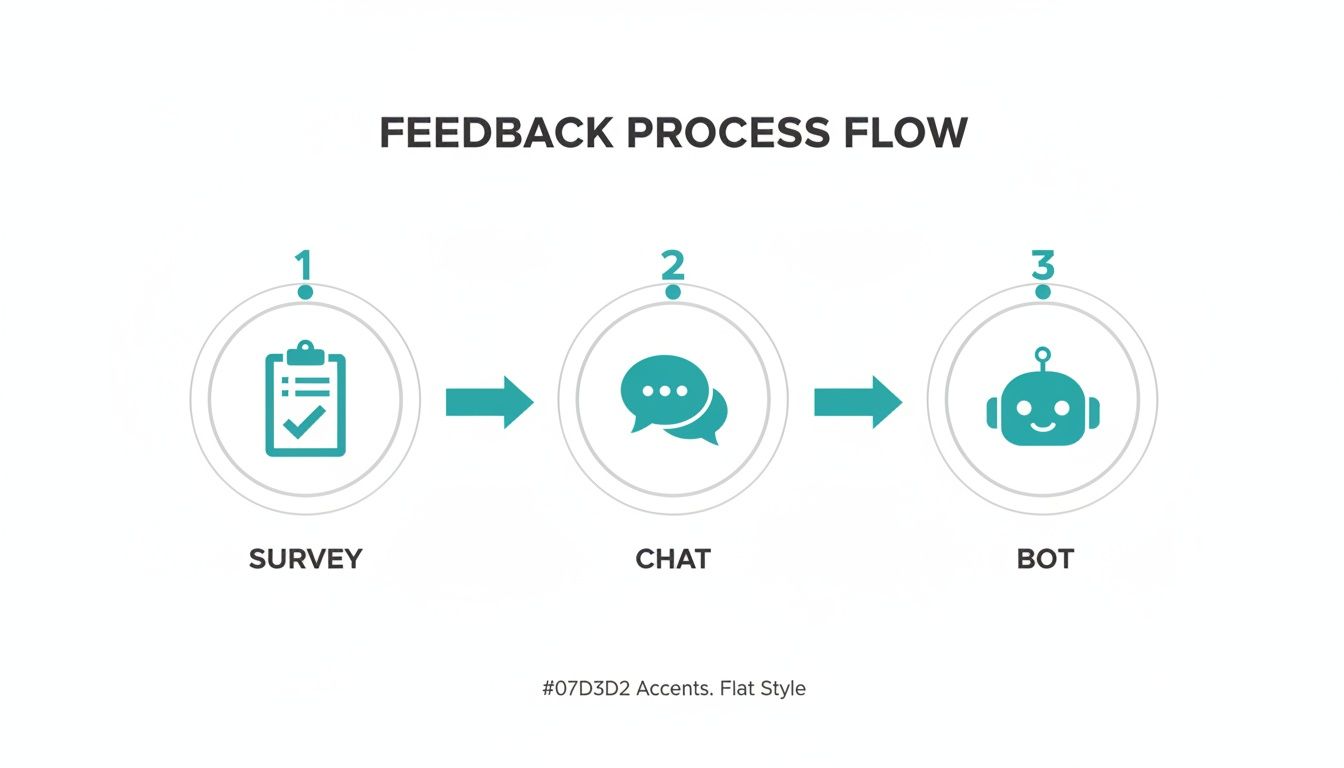
This diagram walks you from broad survey snapshots through live chat check-ins to continuous AI listening—ensuring no insight slips through the cracks.
Sequencing Touchpoints
Start with a quick survey right after key milestones to establish baseline metrics.
Then weave in chat prompts that clarify answers and uncover unexpected details.
Finally, let your AI bot capture ongoing mood shifts in the background.
Spacing these interactions keeps fatigue low and context fresh, so every ask feels relevant.
Best Practice Tips
Keep surveys under five questions to prevent drop-offs.
Use friendly, conversational language in chat prompts to encourage honest feedback.
Check your bot’s sentiment trends weekly to catch emerging issues early.
A regular feedback review helps you prioritize next steps based on real customer voices.
A feedback loop that combines surveys, chat, and passive listening reveals the full story behind customer sentiment.
Real-World Scenario
At WidgetCo, a simple post-sale survey flagged 30% of buyers concerned about delivery speed. A follow-up chat uncovered packaging flaws, leading to new handling protocols within days. Meanwhile, an AI bot tracked a rise in “missing part” comments and triggered a proactive support email. That three-pronged approach drove overall feedback volume up by 60%—and equipped the team with clear action items.
Use these methods in concert to build a feedback ecosystem that’s both comprehensive and customer-friendly.
Define Feedback Goals And Select Channels
Getting clear on what you want to learn shapes both your survey questions and the channels you pick. If you miss that alignment, you can end up with data that feels interesting but isn’t actionable.
A SMART framework keeps things honest and focused:
Specific spells out the exact outcome you need
Measurable ties each goal to a clear metric
Achievable checks capacity and resources
Relevant ensures you’re solving a business priority
Time-Bound gives you a deadline for insights
Align Goals With Business Priorities
You don’t want feedback for feedback’s sake. Connect each target to real initiatives.
For instance, a mobile app team tracked task completion rates and then ran an in-app prompt right after onboarding. That direct link let them pinpoint drop-off moments.
Meanwhile, a subscription service set quarterly NPS targets and tied them to email surveys. The result? A dramatic uptick in follow-up conversations with unhappy customers.
Aligning feedback goals with company objectives prevents data collection from drifting.
Research On Feedback Trends
Recent numbers tell an eye-opening story. In Q3 2024, only 31% of consumers offered feedback after a very good experience—a drop of 6.5 points since 2021. After a very poor experience, the rate slid to 32%, down 7.7 points.
When they do share criticism, 49% turn to email and 40% post on websites. That shift underlines why waiting passively for comments isn’t enough. Read the full research about consumer feedback channel shifts on Qualtrics.
Choosing Channels That Match Your Audience Habits
Think about the friction each option creates and the effort to maintain it. A B2B dashboard might slide in an unobtrusive in-app popover, while an online store often leans on email blasts or SMS nudges.
Key criteria to weigh:
Likely response rate per channel
Setup complexity and ongoing upkeep
Cost for each completed response
| Channel | Best For | Friction Level |
|---|---|---|
| Email Surveys | Detailed feedback | Low |
| In-App Prompts | Real-time insights | Medium |
| Website Widgets | Passive listening | Low |
| SMS Links | Quick ratings | High |
Choosing the right channel boosts engagement and quality of insights.
Creating A Channel Decision Matrix
Put your goals and channels side by side. This removes guesswork and keeps everyone aligned.
Onboarding Ease: In-App Prompt → Chat Widget
Satisfaction Score: Email Survey → Website Widget
Feature Suggestions: Website Widget → SMS Link
| Feedback Goal | Primary Channel | Secondary Channel |
|---|---|---|
| Onboarding Ease | In-App Prompt | Chat Widget |
| Satisfaction Score | Email Survey | Website Widget |
| Feature Suggestions | Website Widget | SMS Link |
Regularly review completion rates, open percentages, and drop-offs. Run A/B tests on invite copy, send times, or visuals. Poll your audience directly about their preferred feedback methods.
“Selecting the right channels is as critical as the questions you ask.” — CX Leader
Listening across email, chat, web, and in-app prompts gives you a richer picture. If one channel underperforms, shift resources to the next best option. Document your findings in a shared dashboard so the whole team can see what’s working.
Over time, explore emerging options like video capture or voice prompts. Use micro-surveys after purchase or ticket resolution for targeted insights. Set up alerts for sudden sentiment drops so you can jump in fast.
Review goals, channels, and metrics every month. That habit sharpens your approach, lifts response rates, and uncovers deeper feelings from your customers.
Now that you’ve defined goals and picked channels, it’s time to craft questions that drive honest, actionable feedback. Check out our guide on best online form builders to find the right tool for your next survey.
Craft Effective Feedback Questions
The way you phrase questions sets the tone for every insight you collect. Nail this, and your survey becomes a goldmine of actionable data.
Mixing a 1–5 rating with a follow-up text box is one simple trick. You get quick, comparable scores and rich commentary in one go.
Use numeric scales to spot trends fast.
Add open-ended prompts for deeper context.
Include skip logic so users only see what matters.
Keep wording neutral to prevent steering opinions.
Writing Clear Unbiased Questions
If wording trips people up, you lose honest answers. Cut jargon and stick with plain terms.
A retail team swapped “Rate your checkout experience” for “How would you rate finding products on our site?” That tweak improved clarity by 20%, proving small changes matter.
Block leading triggers. Steer clear of adjectives like “excellent” or “poor,” and favor straightforward phrases.
Well-worded questions guide respondents toward genuine opinions rather than predetermined answers.
Using Skip Logic And Branching
Skip logic is a secret weapon. It lets you tailor questions so no one sees irrelevant follow-ups.
Imagine a travel app asking, “Did you book a flight?” Only those who answer “Yes” get the next set of queries. This keeps surveys tight and focused.
Scenario: Product feedback → Trigger: “Did your item arrive on time?” → Follow-up: packaging, condition, courier
Scenario: Feature interest → Trigger: “Interested in new alerts?” → Follow-up: toggle options, frequency
Run quick A/B tests on your phrasing. You’ll often see 15–25% lifts in completion just by swapping a few words.
Balancing Quantitative And Qualitative
Combining scales with open text uncovers both patterns and the “why” behind them. One software vendor used a 1–7 ease-of-use scale alongside “What could make this simpler?” The result? Four new feature ideas surfaced overnight.
To keep fatigue low, limit open-text to one question per survey. Place a character cap or example placeholder to guide responses.
A balanced mix of scales and open text reveals both trends and motives behind them.
Keep prompts under 100 characters for clarity.
Show an example placeholder to set tone and length.
Ask just one open-ended question per survey.
Drafting A/B Test Variants
Label your drafts clearly as Variant A and Variant B. Change one element at a time so you know exactly what’s working.
Swap question tone.
Alter scale ranges.
Compare completion rates.
Iterate on the winning version.
This step-by-step tweak-and-test approach uncovers which phrasing resonates best.
Pilot Testing And Iteration
Never launch blind. Run a pilot with 20–30 participants first. Track how long it takes them and watch for drop-off points.
Afterwards, ask testers, “Were any questions unclear?” Their candid feedback often highlights hidden snags in your survey.
Check out our guide on survey questions examples in our article for sample prompts you can adapt.
Refine questions based on real pilot data. These small adjustments keep your survey sharp and engaging.
Key Takeaways
Clear, concise questions drive response quality and completion.
Skip logic personalizes the flow, reducing irrelevant steps.
A/B testing pinpoints the most effective wording.
Pilot and iterate regularly to catch confusion early and maintain high response rates.
Implement Conversational Feedback With Formbot
Surveys often feel stiff. Formbot flips that script, guiding users through a chat that feels timely and personal. By popping up questions where your customers are already engaged, you’ll see completion rates climb—and grab extra metadata that static forms miss.
Customize Triggers And Flows
Picture this: a prompt that fires the instant someone checks out, asking for a quick rating. Or a “How did we do?” chat bubble after support wraps up a ticket. You can even ask about a feature tour the moment a user hits their first milestone.
Checkout Completion Prompt: Invite a star rating plus a short comment right after purchase.
Ticket Closure Prompt: Slip in feedback as soon as a support issue is resolved.
Milestone Prompt: Check in after first login or feature tour to see what resonates.
Hook these into your system by mapping event hooks to Formbot endpoints or dropping in tiny SDK snippets.
Layer AI Follow-Ups
When someone offers a vague response, an AI nudge can ask for details—no extra buttons necessary. This nets richer insight like sentiment scores, location stamps and urgency flags.
By end-2025, 95% of interactions will be driven by AI, cutting costs by 30% (KPMG). Want more stats? Check out Customer Service Statistics on Text.com.
Clarify Ambiguous Inputs: Trigger “Can you tell me more about…?” based on keywords.
Sentiment Probing: Use AI to rate tone and follow up with a brief comment request.
Context Capture: Pull in user agent, geolocation or purchase details automatically.
Embed And Style The Chat
Your brand has its own look. Formbot’s theming options let you match colors, fonts and icons without extra work. Layout controls keep each question in its own space—no walls of text here.
In that view, you’ll see how the chat flows from star rating to free text and onto AI-driven follow-ups. That smooth journey can boost completion rates by up to 2.5x on mobile.
GDPR Compliance: Built-in consent toggles and custom data retention settings.
Accessibility: Screen-reader friendly with keyboard navigation support.
Mobile Optimization: Single-question layouts to cut down on scrolling.
GDPR And Privacy Settings
Consent has to be crystal clear. Formbot shows an opt-in at each chat’s start, then you choose how long responses live. Need to anonymize or delete? It’s all managed via API or the dashboard.
Consent Banner: A simple opt-in step before data collection kicks off.
Data Retention Controls: Pick retention windows from 30 days to multiple years.
Erasure Requests: Handle user deletion requests with a click or an API call.
These privacy options help you stay in line with GDPR, CCPA and related rules.
Launch Across Channels
Whether it’s on your site, in an app or inside a chat widget, Formbot is ready. Just drop in a script tag or plug in our SDK to set custom loading triggers.
Web Embed: Paste the snippet right before .
SDK Integration: Install via npm or link a CDN for React, Vue or Angular.
Chat Widget: Choose a side panel or pop-up that appears on scroll or click.
Keep an eye on open rates, click rates and completion times. Tweak questions, adjust trigger moments and refine AI prompts based on real data.
Key Takeaway
Formbot’s conversational forms drive engagement by asking the right question, at the right time in the flow.
Distribute Surveys And Boost Response Rates

Getting more replies isn’t about luck—it’s all in the timing, format and channel mix. Send surveys right after a support case wraps up or a purchase is confirmed. Add a few well-timed reminders and sprinkle social proof into your subject lines to spark interest.
Timing Your Survey Sends
Catching people when their experience is fresh makes a difference. Trigger surveys:
Immediately after ticket closure or a purchase completes.
In a drip email two days later for anyone who didn’t respond.
With subject lines featuring proven numbers—one tweak pushed open rates up by 18%.
Ask new customers about checkout ease or tag questions to support IDs for sharper insights.
Optimize Invitation Copy
A punchy subject line can skyrocket engagement. In one split test, swapping “We Value Your Feedback” for “Join 2,000 Peers Who Shared Feedback” boosted opens by 18%.
Brainstorm two headline options.
Test each on a small segment.
Compare opens and click rates.
Roll out the higher performer to your full list.
Comparison Of Feedback Channels
Here’s a quick look at how popular feedback channels compare. Use it to pick the best mix for your goals.
| Channel | Response Rate | Best Use Case |
|---|---|---|
| 30% | Detailed, multi-question forms | |
| Live Chat | 45% | Quick star ratings and comments |
| SMS | 20% | Short, timely single questions |
Use this table to guide your channel selection and maximize responses.
Use Mobile-First Design
Most people open surveys on their phones, so tap-friendly layouts matter. A/B tests showed that mobile-optimized forms lifted completions by 25%.
Drop a quick rating scale into your chat widget to grab feedback where users already engage.
Check out our guide on customer feedback form templates to kickstart your next campaign.
Great invites blend timing, copy, design and channel choice to maximize response.
Incentivize Thoughtfully
Thoughtful rewards can nudge more people to reply without skewing results. One B2C brand offered $5 gift cards and saw a 12% lift in participation.
At the same time, a B2B company let respondents donate their reward to charity and increased feedback volume by 15%.
Keep incentives modest to preserve honesty.
Offer charitable donations to align with values.
Cap total redemptions to control budgets.
Disclose any reward clearly upfront.
Test And Iterate Always
Even top-performing surveys benefit from constant tweaks. Schedule monthly reviews to:
Track completion times and drop-offs on mobile.
Monitor fallback rates in chat prompts.
Compare performance across demographics.
Refresh visuals to stay on-brand.
Segmented invites show customers you value their unique journey.
A habit of testing, personalization and timely outreach turns feedback into a genuine growth engine. Ready to boost your response rates? Experiment with these tactics today. Platforms like Formbot make it simple to launch conversational surveys in minutes.
Get feedback that fuels growth and loyalty starting now.
Analyze Feedback And Close The Loop
Once you’ve collected customer responses, the next challenge is turning noise into insights. Cleaning up your data is the first step—remove what doesn’t belong so your analysis stays on point.
Remove duplicate submissions and irrelevant entries
Normalize date stamps, user IDs, and session metrics
Strip out HTML artifacts and correct punctuation errors
With clean data in hand, sort issues by how often they occur and how much they hurt your users. That way, you know which problems deserve your immediate attention.
High Frequency + High Impact → Kick off cross-team sprints right away
Low Frequency + High Impact → Slot into your quarterly roadmap
High Frequency + Low Impact → Bundle into smaller releases
Cleaning And Tagging Feedback
Give each comment a sentiment label—positive, neutral, or negative—to gauge overall mood. Then categorize by topic (usability, pricing, support) so patterns emerge faster.
Define sentiment labels and scoring rules that match your brand voice
Leverage Formbot or similar tools to auto-tag comments
Manually review edge cases to catch sarcasm or industry jargon
Flag urgent complaints with alerts. A single “service down” message from a VIP user can ping your Slack channel and trigger an all-hands response.
For example, a retail team spotted “long checkout time” complaints, then linked each remark to fixes like one-click payment and guest checkout. As they tagged feedback, 27% of shoppers cited shipping delays as their top frustration.
On average, teams that tag feedback see a 35% reduction in issue resolution cycles.
Building Trend Dashboards
Visual dashboards turn raw numbers into stories. Choose 4–6 metrics—like sentiment score, response volume, resolution time—and display them in easy charts. Then set alerts for shifts over 5% to catch sudden changes.
| Metric | Purpose | Visualization |
|---|---|---|
| Sentiment Score | Track mood shifts over time | Line chart |
| Issue Frequency | Spot recurring complaints | Bar graph |
| Average Resolution | Measure support efficiency | Gauge indicator |
For leadership, boil it down to a one-page executive summary. Highlight the top three trends, include illustrative quotes, and offer a clear action list. One B2B service team even automated follow-up emails to thank key clients and share upcoming features—lifting trust scores by 18% in just one month.
Best Practices For Closing The Loop
Review sentiment tags and categories in weekly cross-functional meetings
Separate quick wins from longer-term projects
Share progress through email updates, in-app notifications, or social posts
Don’t forget to track your closure metrics:
Send targeted updates based on specific feedback themes
Publish a public product roadmap so customers can see real progress
Reward contributors with discounts, early access, or branded swag
“Closing the loop shows customers their voices weren’t lost,” says a CX leader with 10 years of experience.
Turning feedback into action is what builds real loyalty. Gathering responses is only the beginning—closing the loop keeps the conversation going.
FAQ

When’s the best moment to ask for feedback? Right after a meaningful interaction. For instance, pop up a quick CSAT survey the second a support ticket closes—you’ll catch fresh impressions and relevant context.
Struggling with low response rates? Personal invites work wonders. Keep surveys under five questions and use a friendly, conversational tone. You’ll see fewer drop-offs and richer insights.
Send reminders at well-timed intervals
Offer a small reward, like a discount code
Use social proof in email subject lines
Test send times by time zone
Personalize subject lines with names
Stick to one channel per request
What’s the simplest way to integrate feedback tools? Most CRMs let you add survey plugins or set up webhooks. Embedding Formbot in your helpdesk or email system means responses flow straight into your dashboard—no manual exports needed.
Integration Options
First, map each feedback event to the right CRM field so every answer ties back to a customer record. Then configure API triggers to push responses into analytics tools in real time. You’ll catch trends as they emerge and act on them quickly.
Don’t forget to anonymize personal details before storing any responses.
“Automation ensures no feedback falls through the cracks,” says a customer success leader.
Ongoing Engagement
Switch up your channels to keep people interested. One month, try an email survey; the next, use an in-app prompt or chat widget. A SaaS team I know saw their response rate climb simply by alternating methods.
| Channel Type | Use Case | Response Lift |
|---|---|---|
| In-App Prompt | Post-login feedback | 25% |
| Email Survey | Monthly NPS | 30% |
| Chat Widget | Support exit velocity | 18% |
Build a simple feedback calendar to schedule regular touchpoints and monitor which channels perform best. When a method starts to falter, pivot quickly. Stakeholders also appreciate seeing quick wins, so share results as you go.
Closing the loop makes a real difference. Customers who see their ideas in action often boost response rates by 40%. Always thank participants and spotlight any changes you’ve implemented based on their input.
Measuring Success
Track the right metrics to refine your approach. For example, align your NPS trend with changes in response rates to uncover patterns.
NPS Trend Line Over Time
CSAT Average Per Campaign
Response Rate Per Channel
Percentage Of Feedback Items Acted On
Time To Action On Feedback
Feedback To Action Ratio
Feedback Velocity Across Channels Weekly
Ready for a more conversational approach to surveys? See how Formbot can help you launch chat-based feedback forms in seconds at tryformbot.com today.



