A poorly designed quote request form isn't just a minor website flaw; it's a hole in your sales pipeline, leaking high-intent prospects who simply get frustrated and leave. Many businesses I talk to don't even realize their outdated, clunky forms are actively pushing away their best potential customers.
Why Your Quote Request Forms Are Costing You Leads
Let's get real for a minute—that long, static quote form you have is probably a major turn-off. We're in 2026, and user expectations are worlds away from what they were even a few years ago. People want interactions that are quick, conversational, and work flawlessly on their phones. They don't want to face an intimidating wall of text fields that feels more like homework than a simple request.

When what you offer doesn't meet what users expect, you get high form abandonment. It's that simple. And that means you're losing qualified leads before your sales team even has a chance to see them.
The Problem with Traditional Forms
The root of the problem with most quote request forms is the sheer amount of friction they create. They often come across as impersonal and demand way too much from the user right out of the gate. This friction shows up in a few common ways:
- They’re Way Too Long: A form with dozens of fields is overwhelming. It’s an instant "nope" for most visitors.
- The Questions are Confusing: Vague or irrelevant fields force people to guess, which leads to bad data for you and a headache for them.
- It Feels Cold and Impersonal: A one-size-fits-all form doesn't care about the user's specific situation, making the whole thing feel transactional.
- They're Awful on Mobile: I still see so many forms that are clearly not designed for mobile screens, even though that's where a huge chunk of users start their journey.
I’ve seen this play out time and time again. Picture a marketing agency that gets dozens of vague inquiries through its generic "Contact Us for a Quote" form. Most of the submissions are just a single sentence like "I need marketing," offering zero useful details.
Now, think about a competitor using a dynamic, guided form that asks simple questions one at a time. This conversational flow effortlessly gathers detailed project specs, budget ranges, and timelines.
The difference is night and day. The first agency wastes hours on back-and-forth emails just to qualify a lead. The second gets a steady stream of well-defined, high-quality prospects who are actually ready for a productive conversation.
This isn't just about tweaking your user experience; it's a core business strategy. A form that doesn't perform well is a direct line to lost revenue. By failing to capture the right information efficiently, you’re not only missing out on immediate opportunities but also hurting how people see your brand. Bringing your quote request forms into the modern era is essential, transforming a point of friction into your most powerful lead-generation tool.
Designing Quote Forms That Convert
To build a quote request form that people actually finish, you have to stop thinking of it as simple "data collection." It's not a spreadsheet. It’s the start of a conversation. Your goal should be to ditch the intimidating wall of fields and create a smooth, guided experience for your potential customer.
The single most effective way to do this is with a one-question-at-a-time conversational flow.
Think about it: instead of seeing a dozen fields and immediately feeling overwhelmed, the user only has to focus on one simple question. This keeps them engaged and moving forward, step by step, which is exactly what you want.
Personalize the User Journey
The real magic of modern forms is personalization. Using conditional logic, you can build an adaptive path for each person, making sure they only see questions that actually apply to them. It’s like having a smart assistant walk them through the process.
Let's say a marketing agency asks: "What service are you interested in?"
- If the user picks "Web Design," the next questions could be about their current website URL and the features they need.
- But if they choose "Print Services," the form might pivot to ask about quantity and paper type.
This kind of simple branching makes the experience feel custom-built and shows you respect the user's time. A prospect looking for a new website will never see irrelevant questions about print jobs. Tools like Formbot let you build these smart, chat-like experiences without needing to code.
A personalized, conversational form isn't just a nicer user experience—it’s a powerful conversion strategy. Switching to guided quote forms can slash user friction and significantly improve lead quality.
Visual Design and User Experience
How your form looks and feels is just as important as what you ask. Good design builds trust and makes the whole process feel effortless. You can dive deeper into this in our guide on web form design best practices.
For now, just focus on these three essential visual elements:
- Clear Typography: Use a readable font that’s large enough for any device. No squinting allowed.
- Ample White Space: Give your form elements room to breathe. Crowded layouts are stressful.
- A Compelling Call-to-Action (CTA): Your final button needs to pop. Use action-oriented text like "Get My Custom Quote" instead of a boring old "Submit."
To really nail this, I always recommend reviewing some solid lead capture form best practices. Ultimately, a well-designed form that feels like a simple, helpful conversation is your best tool for turning curious visitors into qualified leads ready to do business.
The Essential Fields Your Quote Form Can't Live Without
Crafting a quote request form that actually converts is all about striking the right balance. You need enough information to give a real, accurate quote, but ask for too much, and you'll scare people away. Moving beyond the simple "name" and "email" fields is the key to qualifying leads properly and saving your sales team from chasing dead ends.
Let's walk through the must-have fields, breaking them down into logical chunks. The goal here is to capture the minimum viable information needed to kick off a productive conversation.
Nailing the Core Contact Details
This is the basic stuff, but you can be smart about how you gather it. Instead of hitting them with a wall of contact fields, just stick to what you absolutely need for that first follow-up.
- Full Name: The most fundamental piece of personal info.
- Business Email: This is non-negotiable for sending the quote and keeping communication professional.
- Phone Number (Optional): I always recommend making this optional. It drastically reduces friction. Some folks welcome a call; others run from it. Giving them the choice shows you respect their time and preferences.
- Company Name & Website: With these two details, you get immediate context on their business—what they do, their industry, and their general size.
The design principles you use are just as important as the fields themselves. Keeping the experience conversational, personal, and visually clean is what separates a good form from a great one.
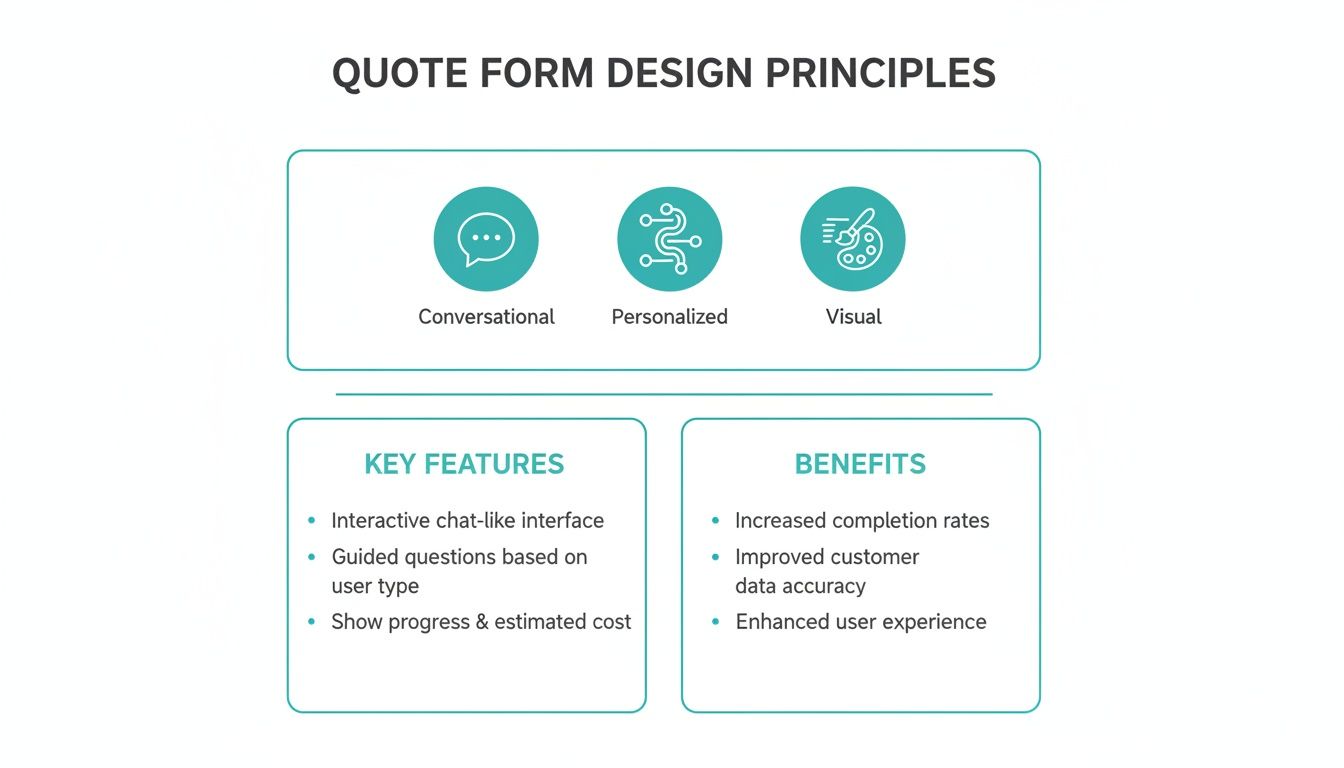
As you can see, blending a conversational flow with personalized questions and a simple, intuitive design creates an experience that people actually want to complete.
Understanding the Project Scope and Requirements
Now we get to the heart of the matter: what do they actually need? A vague, open-ended "Project Details" box is a recipe for vague, unhelpful answers. You have to guide them.
Instead of a lazy "What do you need?" prompt, ask pointed questions that get you the specifics:
- What are your main goals for this project? (Think multiple choice: Increase Sales, Generate Leads, Improve Brand Awareness)
- What does a home run look like for you? (This gets them to define success in their own words and helps you understand their real expectations.)
- Do you have any specific deliverables in mind? (This lets them list concrete items, like "a new logo" or "a 5-page website.")
For more complex jobs, letting users attach a project brief or inspiration files can be a game-changer. You can get some great tips on how to handle form file uploads properly. This one small feature can massively boost the quality of the information you get right from the start.
A classic mistake I see all the time is getting too technical, too soon. Focus on the 'what' and 'why' of the project first. You can always dive into the technical 'how' on a follow-up call after you know they're a qualified lead.
Modernizing Your Form Fields for Better Data
Swapping out old-school, high-friction fields for modern, conversational alternatives makes a massive difference in both user experience and the accuracy of the data you collect. It's less about just asking a question and more about making it easy and intuitive to answer.
| Data Point | Traditional Field (High Friction) | Modern Field (Low Friction) |
|---|---|---|
| Budget | "What's your budget?" (Open text field) | A slider or pre-defined price ranges (e.g., $5k-$10k, $10k-$25k) |
| Timeline | "When do you need this done?" (Open text field) | A calendar date picker for a specific deadline |
| Service Needed | "What service are you interested in?" (Dropdown) | Visually engaging cards or icons for each service |
| File Submission | "Attach files" (Basic file input) | Drag-and-drop file upload zone with progress bars |
By using these low-friction alternatives, you turn potentially awkward or intimidating questions into simple, straightforward steps. It's a small change that pays huge dividends in form completions and lead quality.
Talking Budget and Timeline (Without Scaring Them Off)
Let's be honest, these two questions can be sensitive, but they're absolutely essential for qualifying a lead. The way you ask makes all the difference. An open text field for budget is a notorious drop-off point—it feels confrontational and can be intimidating.
Using smarter field types is a much better approach. For instance, offering budget ranges as buttons or a slider removes the guesswork and pressure. People are far more likely to click $10k-$25k than they are to type "15000" into a blank box.
Similarly, asking for a timeline with a simple calendar date picker is clean and direct. It helps you quickly see if a prospect is a good fit and ensures your team isn't wasting precious time on leads whose expectations don't match what you can deliver.
Automating Your Quote and Lead Workflow
The true power of a modern quote request form isn't just about collecting information—it's what happens the moment a potential customer hits 'submit.' This is where you can gain a serious competitive edge. Automating your post-submission process is the key to transforming your entire lead management system from a manual chore into a high-speed engine.
When you connect your forms to the tools you already use, you can finally say goodbye to the mind-numbing task of manual data entry. More importantly, you dramatically cut down your response time and make sure a hot lead never gets lost in a crowded inbox. This isn't some complex, enterprise-only strategy; it’s a practical way to make your sales cycle faster and way more effective.

Building a Seamless Post-Submission Machine
Picture this: a prospect fills out your carefully crafted quote form. Instantly, without anyone on your team lifting a finger, a series of events kicks off.
- A new lead pops up in your CRM (like Salesforce or HubSpot), with every piece of data from the form neatly organized in the correct fields.
- Your system automatically assigns a task to the next available sales rep, complete with a due date.
- The prospect gets a personalized email confirming their submission and outlining what happens next, managing their expectations from the get-go.
- A notification pings in your team's Slack channel, letting everyone know a high-value lead just came in.
This kind of hands-off system creates a direct, immediate bridge between your marketing efforts and your sales team's actions.
The whole point of automation is to shrink the time between a prospect's interest and a salesperson's response to practically zero. Every minute you save is a minute a competitor can't use to snatch that lead away.
Making Automation Accessible for Everyone
You don’t need a dedicated development team to make this happen. Most modern form builders offer built-in integrations with the most popular business software. And for anything else, tools like Zapier act as a universal connector, letting you link your quote forms to thousands of other apps.
If you want to take your lead nurturing to the next level, it's worth learning how to build a powerful marketing automation workflow from the ground up. By automating these initial, critical steps, you free up your team to do what they're best at: building relationships and closing deals, not just copying and pasting data all day.
Analyzing Performance to Boost Conversions
Your quote request form isn't a "set it and forget it" kind of tool. Think of it as a living asset that needs regular check-ups and fine-tuning. Launching the form is just the starting line; the real work of maximizing leads comes from digging into the data to see how people actually use it and then making smart, incremental changes.
To get started, you'll want to track a few key performance metrics. These numbers tell a story, revealing where your form is working well and, more importantly, where it's causing friction that makes people give up.
Key Metrics for Your Quote Form
Your analytics dashboard is about to become your best friend. Instead of guessing what might be wrong, you can lean on hard data to find the exact sticking points and make targeted fixes.
You'll want to keep a close eye on these three core metrics:
- Completion Rate: This is the big one. It's the percentage of people who start your form and actually submit it. A low number here is a major red flag that something is scaring users away.
- Drop-Off Rate: This metric shows you the exact spot where people are bailing. Is everyone disappearing when you ask about their budget? Maybe you’re asking for a phone number too soon. This data is pure gold for pinpointing specific problem fields.
- Time to Complete: How long is it taking the average person to fill out the form? If it’s dragging on, you probably have too many questions, or some are worded in a confusing way. A faster completion time almost always means a better user experience.
Turning Insights Into Action
Once you have the data, the fun begins. Let's say you discover a massive 75% drop-off on the question asking for a prospect's budget. That’s not a coincidence; it's a clear signal that something needs to change. The question might feel too intrusive, or you might be asking for it before you've built enough trust.
The secret to a consistently high-converting form is relentless, data-backed improvement. Don't just set it and forget it. Treat your form like a product that you are constantly iterating on based on user feedback and behavior.
This is where A/B testing becomes invaluable. You can test different versions of your form to see what truly connects with your audience. Try reordering the fields, rewording a tricky question, or even testing a standard layout against a conversational one. Every test provides crucial insights you can use to nudge your conversion rate higher. For a deeper dive, check out our guide on essential conversion rate optimization tips.
By using real-time analytics, marketing teams can iterate quickly, turning more casual inquiries into actual revenue. You can find more insights on this from the team at EmbedSocial.
Common Questions About Quote Request Forms
Even with a great design and solid automation, you're bound to run into a few questions when you're in the trenches building and tweaking your quote request forms. Getting straight answers to these common sticking points can be the last piece of the puzzle for perfecting your lead capture process. Let's tackle some of the most frequent questions we hear.
How Long Should My Quote Form Be?
This is the classic dilemma, and honestly, there's no single magic number. My advice? Keep your form as short as you possibly can while still getting the bare minimum you need to qualify a lead. For most businesses in 2026, that sweet spot is around 5-7 core questions to get the ball rolling.
The real key here is to use a multi-step or conversational format. When you break the form down into smaller, bite-sized questions, you drastically lower the intimidation factor. A user sees one simple question at a time, not a giant wall of fields, which keeps them engaged and moving forward.
Remember, the goal isn't just to get a submission; it's to start a quality conversation. A conversational form feels less like an interrogation and more like a helpful guide, which is exactly why it almost always results in higher completion rates.
Tools like Formbot are designed for this exact purpose, guiding users through a one-question-at-a-time flow that makes the whole process feel quick and painless.
What Is the Best Way to Ask About Budget?
Ah, the budget question. It's a notorious drop-off point, but it's often a necessary evil for qualifying leads. The secret is to stop using an open-ended text field like, "What's your budget?" That question feels confrontational and often makes people freeze up or lowball the number.
Instead, make it easy and low-pressure. Offer pre-defined ranges using radio buttons or even a visual slider. This simple change transforms the question from a scary demand into a simple choice.
A few tips that have always worked for me:
- Frame it positively: Try something like, "To help us find the best solution, what's your estimated project budget?"
- Make it optional: This can dramatically reduce friction, especially for people who are just starting their research and don't have a firm number yet.
- Place it later in the form: Ask about their needs and goals first to build some trust and show your value before you bring up money.
Should I Use a Traditional or Conversational Form?
For almost every business I've seen, a conversational, one-question-at-a-time form will absolutely outperform a traditional static one. This is especially true on mobile, which is where a huge chunk of your users are probably coming from. Conversational quote request forms just feel more personal, are far less overwhelming, and can even adapt intelligently based on a user's answers.
This interactive experience naturally leads to better engagement and, ultimately, more completed forms. A traditional layout might still have a place for super simple (think 2-3 field) forms or in very niche B2B industries where users are almost exclusively on desktops. But the trend is clear: people expect a guided, chat-like experience.
Ready to stop losing leads to outdated forms? With Formbot, you can build a high-converting, conversational quote request form in seconds. Get your custom quote today.



