
File uploads are one of those make-or-break moments in any form. You're asking a user to hand over something important, whether it's a resume, a project brief, or a personal photo. If that process is clunky, confusing, or feels insecure, you've just created a massive bottleneck that kills your conversion rates.
It's a silent killer of good forms.

Where the Upload Button Fails You
Think about it from a user's perspective. For an HR team, that frustrating upload field is why you’re losing out on top-tier candidates who simply give up on the application. For marketers, it’s the reason your user-generated content campaign sputters out—no one wants to wrestle with a difficult interface just to share a photo.
This friction gets even worse on mobile, where users are often trying to find a specific document buried in their phone's file system. When they have to fight the UI to attach a simple PDF, their trust in your brand starts to crumble. They wonder if the form is broken or if their data is even safe. That moment of doubt is often all it takes for them to abandon the form entirely.
The Numbers Don't Lie: A Look at the Conversion Drop
The data paints a pretty stark picture. The average conversion rate for a standard online form hovers around a dismal 1.7%. Let that sink in: for every 100 people who start your form, 98 of them bail before hitting "submit." A poorly designed file upload is a major contributor to that drop-off, a problem that has led to solutions like a dedicated photo upload site for specific use cases.
The good news is that the right approach can make a huge difference. We've seen that modern conversational forms can deliver up to 2.5x higher completion rates and lead to 40% faster submissions.
The table below breaks down how getting the file upload experience right—or wrong—can directly impact your bottom line.
Impact of Form File Upload Experience on Key Business Metrics
| Upload Feature | Poor Implementation Impact | Optimized Implementation Impact |
|---|---|---|
| User Interface | Confusing "Choose File" button leads to user frustration and high abandonment rates. | Clear, intuitive drag-and-drop or guided selection boosts user confidence and submission rates. |
| Mobile Experience | Difficult navigation through mobile file systems causes users to give up. | Direct access to camera and photo library makes mobile uploads seamless, increasing on-the-go submissions. |
| Feedback & Progress | No visible progress bar or confirmation creates anxiety and uncertainty. | Real-time progress indicators and instant previews reassure users their file is being handled correctly. |
| Error Handling | Vague error messages (e.g., "Upload Failed") leave users stuck and unable to proceed. | Specific, helpful errors (e.g., "File is too large, please upload under 5MB") guide users to a solution. |
As you can see, these aren't just minor tweaks; they are fundamental to creating a user journey that feels supportive and reliable.
A file upload isn't just a technical feature; it's a moment of truth. Getting it right builds user confidence. Getting it wrong creates a dead end.
This is where a more guided, interactive approach really shines. Instead of just a static button, conversational forms walk the user through the process, turning a tedious task into a smooth, reassuring interaction. If you're looking to turn your forms from conversion blockers into conversion drivers, a great place to start is with our guide on essential conversion rate optimization tips.
Designing a File Upload Experience People Actually Like
Let's be honest: file uploads can be a real pain point in any form. A clunky, confusing upload field is a surefire way to make someone give up and leave. But a great upload experience? It's almost invisible. It should feel as effortless and intuitive as sending a photo to a friend.
The goal is to trade user frustration for confidence. It’s all about creating a smooth, reassuring step in their journey, not a roadblock.

The secret is clear communication, baked right into the design. Ditch that generic "Choose File" button. Instead, give users a well-defined drop zone that practically screams, "Drag your files here!" This visual hint is a game-changer on desktop, immediately showing people how to interact with your form.
Then, add some simple, direct instructions right where people need them. Don't make them guess. Spell out the rules upfront: "Accepts PDF, DOCX, or JPG" and "Max file size: 10MB." This small bit of guidance prevents the all-too-common error of trying to upload the wrong thing, which is a major reason people abandon forms.
Give Instant and Obvious Feedback
The moment a user drops a file, your interface needs to react. This is where visual feedback is everything. Instantly show the file's name, its size, and maybe a little icon for the file type. This confirms their action worked.
If you’re asking for images, a small thumbnail preview is even better. It lets the user see with their own eyes that they grabbed the right picture.
This feedback loop needs to cover the entire process, from start to finish.
- Show the Progress: For any file that isn't tiny, a real-time progress bar is a must. It tells the user what's happening and manages the anxiety of waiting.
- Confirm Success: A simple checkmark or a clear "Upload Complete" message gives a sense of finality and relief.
- Offer an Escape Hatch: Always provide an easy way to remove a file and start over. A little 'x' icon next to the filename is the universal signal for "oops, let me fix that."
A well-designed file upload element anticipates user needs. It provides clarity before the action, feedback during the action, and confirmation after the action.
Think Mobile-First and Accessible
Designing for mobile isn't just a good idea; it's essential. Drag-and-drop is clunky on a touchscreen, so the approach has to be different. A large, easy-to-tap button is the way to go. It should connect directly to the phone's camera or file library, creating the native experience everyone is used to.
For a great example of an interface built purely for this purpose, check out saucial.app's upload feature.
Beyond the device, you have to think about the user. Accessibility ensures everyone can use your form. That means following Web Content Accessibility Guidelines (WCAG) so your upload field is keyboard-navigable and has clear labels for screen readers. A truly great design is one that works for all users, no matter how they access your form.
For a deeper dive into making your forms more user-friendly across the board, take a look at our comprehensive guide on web form design best practices.
Building a Security Fortress for Your File Uploads
When you let users upload files, you're taking on a serious responsibility. A single bad file can open the door to all sorts of trouble, so security can't just be an afterthought—it has to be baked into your design from day one. It's not about finding one perfect solution; it's about layering your defenses.
This process actually starts on the user's side of the screen. Think of client-side validation as your first line of defense. By checking file types (like .jpg or .pdf) and sizes right there in the browser, you can instantly block a huge chunk of problematic uploads. It gives the user immediate feedback and saves everyone's bandwidth.

But here's the thing: anyone with a bit of know-how can bypass those browser-side checks. That’s why the real security work happens on your server.
Non-Negotiable Server-Side Checks
Once a file hits your server, you have to assume it's hostile until you can prove it's safe. This is where your backend code needs to be relentless, double-checking everything the browser claimed to be true.
These server-side checks are non-negotiable:
- MIME Type Verification: Never, ever trust a file extension. A malicious script called
virus.execan easily be renamed toinvoice.pdf. Your server needs to look inside the file to confirm its actual MIME type (e.g.,application/pdf) is what you're expecting. - Malware Scanning: Every single file needs to be run through a malware scanner. Integrating a service like ClamAV into your upload process can automatically catch and quarantine threats before they have a chance to execute.
- Strict File Naming: Never use the filename a user provides. A clever attacker might upload a file named
../../etc/passwdto try and exploit a directory traversal vulnerability. Your best move is to generate a completely random, unique string for every file name.
Security isn't an afterthought; it's the foundation. A security vulnerability in your file upload process, like the critical CVE-2026-49387 found in a WordPress plugin, can allow an attacker to gain full control of your server through a single upload.
Secure Storage and Data Privacy
Protecting your server is one half of the equation. Protecting your users' data is the other.
Once a file passes all your checks, it needs a secure home. Storing uploads in a private cloud bucket on Amazon S3 or Google Cloud Storage is infinitely safer than just dumping them into a public web folder. To control who can see them, use signed URLs. These are temporary, secure links that provide time-limited access to a specific file, which is a great way to prevent unauthorized browsing.
And then there are the regulations. Rules like GDPR mean you have a legal duty to protect personal information. Files must be encrypted both in transit (with SSL/TLS) and at rest (on the server). This is absolutely critical if you're handling sensitive documents. You can dive deeper into this by reading our guide to creating HIPAA-compliant online forms.
This multi-layered approach is becoming standard practice. The online form builder software market was valued at USD 2.53 billion in 2024 and is projected to hit USD 5.51 billion by 2033, largely because businesses need secure, code-free ways to handle data. You can learn more about the growth of the global online form builder market here.
Smart Storage and Backend Workflow Automation
So, your user just uploaded a file. Great! But where does it go? And what happens next? This is where the real magic happens, turning a simple file drop into a smart, automated workflow. Getting this backend part right is the difference between an efficient system and a constant headache.
The simplest, most old-school approach is local server storage. This means the uploaded file gets saved right onto the same server that runs your website. It’s quick to set up for a basic contact form, but that’s about where the benefits end. This method eats up your server's resources, can slow your site to a crawl, and if you misconfigure anything, you’ve just opened a massive security hole. Frankly, it just doesn’t scale.
Choosing Scalable Cloud Storage
For any serious application, you need to look to dedicated cloud storage. Services like Amazon S3 or Google Cloud Storage are built for this exact purpose—to store huge amounts of data safely and affordably.
When you hook your form uploads directly to a cloud storage "bucket," you immediately unlock some powerful advantages:
- Scalability: Forget worrying about disk space. These services grow with you, whether you get ten files or ten million.
- Durability: Files are automatically replicated across multiple locations. This offers a level of data loss protection a single server could never match.
- Security: These platforms come with robust security features baked in, from granular access controls to encryption.
Want to make file delivery lightning-fast? Pair your cloud storage with a Content Delivery Network (CDN). A CDN acts like a global network of file caches. When someone needs to view an uploaded file, it’s served from a server physically close to them, which slashes loading times.
Automating Workflows After Upload
Here’s where you can build some truly powerful systems. Don't just let those uploaded files sit there collecting digital dust. Instead, use the upload event to trigger an entire automated pipeline. This is typically done with serverless functions—think AWS Lambda or Google Cloud Functions—that spring into action the moment a new file hits your storage.
Treat your storage bucket less like a filing cabinet and more like a starting pistol. Every new file can kick off a chain reaction of automated tasks that saves you time and secures your system.
What kind of workflows are we talking about?
- Run a Virus Scan: The instant a file lands, have a tool like ClamAV scan it for malware and quarantine anything suspicious before it ever touches your core systems.
- Generate Thumbnails: If you're accepting images, a function can automatically create smaller, optimized versions for galleries or profile pictures. No manual resizing needed.
- Extract Data: Imagine a user uploads a PDF resume. An automated process could pull out their name, contact info, and skills, then neatly populate your applicant tracking system.
This kind of automation isn't just a nice-to-have; it's essential. We're living in an era of explosive data growth. Global data creation is projected to jump from 149 zettabytes in 2024 to over 394 zettabytes by 2028. Form uploads are a huge piece of that puzzle. Building a smart, automated backend is the only way to keep your head above the water. You can dive deeper into these big data statistics and what they mean for businesses to see just how critical this is.
Alright, let's move from the high-level theory into the practical side of things. All the best practices in the world don't mean much if they're a nightmare to implement. This is where a tool like Formbot really shines, transforming what used to be a complex coding challenge into a simple, conversational step.
The goal is to stop making users feel like they're wrestling with a clunky machine. Instead, we can build a form that feels more like a quick, helpful chat.
This conversational approach fundamentally changes the user experience. You're no longer just showing a static "Upload File" button and hoping for the best. Instead, Formbot guides the user through the process naturally. A simple prompt like, "Great, could you please upload your resume now?" turns a chore into a logical next step in a conversation. This is a game-changer, especially on mobile where traditional file pickers can be awkward.
Getting Your First File Upload Up and Running
Adding a file upload question in Formbot is incredibly direct. You just decide what you need to collect, and the form builder handles the rest of the user interface. It’s perfect for common use cases like job applications, support tickets, or project intake forms.
Let's say you're building a job application. You can add a question that specifically asks for a resume. Then, you can easily dial in the important settings behind the scenes:
- Accepted File Types: You can restrict uploads to specific formats, like PDF or DOCX, ensuring you get clean, usable files every time.
- File Size Limits: It’s smart to set a maximum file size, say 5MB, to prevent huge files from slowing down your workflow and eating up storage.
This diagram shows how a modern, automated system should handle files—from the moment they're uploaded to when they're securely stored and processed.
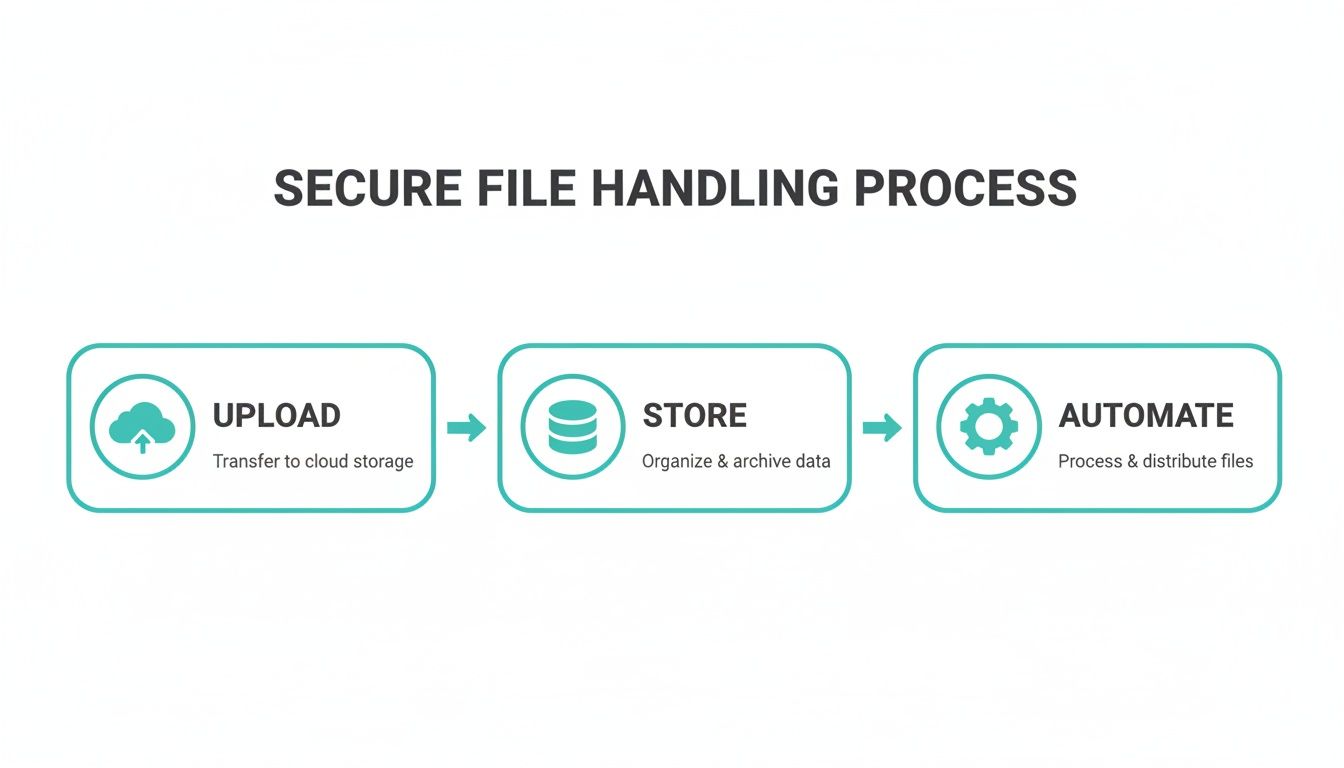
The real takeaway here is automation. A well-designed system handles the entire backend pipeline for you, making file management efficient and secure without you having to lift a finger.
Why Conversational Uploads Are a Better Experience
The biggest win with this approach is how it smooths out the entire process for the end-user. The conversational interface feels guided and supportive, not demanding.
Think about someone submitting a bug report. The form can ask, "To help us see what's wrong, could you attach a screenshot of the error?" The user is then presented with a clear, tappable button to open their camera or file library. Formbot manages the progress indicators and confirmation messages, so the user is never left wondering if their file actually went through.
By turning the upload process into a simple request within a chat, you eliminate the guesswork and anxiety often associated with traditional forms. This small shift in user experience can lead to a significant boost in completion rates.
What’s great is that this isn't some enterprise-only feature. Based on Formbot's pricing for 2026, the free plan includes file upload capabilities. This means any team, regardless of size or budget, can start building more human-friendly, effective forms right away.
Answering Your Toughest File Upload Questions
Even with a perfectly designed form and a solid backend, file uploads come with their own set of tricky questions. Let's tackle some of the biggest ones I see pop up time and time again—the practical details that can make or break your user experience and security.
What Are the Biggest Security Risks?
Security is, without a doubt, the number one concern. When you let users upload files, you're essentially opening a door into your system. You have to be incredibly careful about what you let through.
The most common threats are surprisingly straightforward but can be devastating if you're not prepared.
- Malicious File Execution: This is the classic nightmare scenario. Someone uploads a script disguised as an innocent file, like a PHP shell named
invoice.pdf. If your server is tricked into running it, an attacker could gain complete control. We saw this happen in the wild with CVE-2026-49387, where a popular WordPress plugin had a vulnerability that allowed exactly this, leading to full server takeovers. - Directory Traversal Attacks: Here, an attacker gets clever with filenames, using something like
../../system/config.phpto try and save their file outside of the designated uploads folder. If they succeed, they could overwrite critical system files. - Malware and Viruses: The most obvious risk. A user might upload an infected file, either by accident or on purpose. That malware could then spread across your systems or even be passed on to other users who download the file later.
My best advice is to adopt a zero-trust policy on your server. Assume every single file is malicious until it has passed through multiple, rigorous validation checks. Never, ever trust the filename or any checks done on the browser side alone.
How Can I Improve the UX for Large Files?
Nothing kills a form submission faster than a slow, clunky upload process for a large file. It’s a real test of a user's patience. The key is to manage their expectations with clear and constant communication.
First off, a real-time progress bar is non-negotiable. It’s a simple visual cue that reassures the user that things are working and gives them a rough idea of how much longer they need to wait. This one element can dramatically reduce the anxiety that leads to form abandonment.
Another powerful technique is file chunking. Instead of trying to upload one massive file in a single go, you break it into smaller, more manageable pieces. These "chunks" are uploaded one by one. This approach is far more resilient to network issues—if one chunk fails, you only have to retry that small piece, not start the entire upload from scratch. And please, validate the file size before the upload even begins. There’s nothing more frustrating for a user than waiting five minutes only to be hit with a "file too large" error.
What Is the Best Way to Handle Mobile Uploads?
Mobile is a completely different ballgame. What works perfectly on a desktop with a mouse and keyboard feels awkward and frustrating on a small touchscreen. You absolutely need a mobile-first design philosophy here.
Think big, easily tappable buttons. Ditch the tiny links and complex drag-and-drop zones that are impossible to use with a thumb. Your form should tap directly into the device's native camera and file system, giving users that familiar, one-touch access to their photo library or files.
This is where conversational interfaces really shine. A tool like Formbot makes the upload a simple, guided step in a chat. A prompt like, "Great, could you upload a screenshot now?" feels natural and effortless. On a small screen, that kind of guided interaction is far more effective than a traditional, static form field.
Ready to stop wrestling with clunky file uploads and start building forms that actually convert? Formbot transforms the entire process into a simple, secure conversation. Our form builder handles the complex UX and backend details for you, so you can focus on collecting the data you need. Explore how Formbot can boost your form completion rates today.



