Ever found yourself staring at a dismal survey response rate, wondering where you went wrong? It’s a common frustration. We often blame the audience or the way we sent it out, but the real culprit is usually hiding in plain sight: the questions themselves.
Confusing, vague, or overly complicated questions are the number one reason people give up on a survey. They just bail, leaving you with a handful of incomplete answers and insights you can't really trust.
This guide isn't about abstract theories. It's a practical, hands-on approach to writing clear, compelling questions that people actually want to answer. Getting this right isn’t just about hitting a higher completion number; it’s about gathering clean data that lets you make genuinely smarter business decisions.
The High Cost of Poorly Worded Questions
The damage from bad questions isn't trivial. Traditional surveys often see a staggering 50-70% of their audience drop off simply because of confusing language. But when you get the questions right—using simple words, a logical flow, and avoiding those tricky "double-barreled" traps—the results can be dramatic.
In fact, the data is clear: a survey with an 80% response rate from a small, well-chosen group provides more accurate insights than a massive survey blast with low engagement. Quality beats quantity every single time. By 2026, the benchmarks show a stark difference. While a typical external digital survey might get a 20-30% completion rate, those using optimized, conversational questions can see up to 2.5x higher completions. For a deeper dive into survey design, the research from SAGE Journals is incredibly insightful.
A survey is a conversation with a purpose. If your questions are confusing, it's like mumbling during an important discussion—your audience will simply tune out. The goal is to make answering feel effortless.
Shifting to a Conversational Approach
The secret to better data is to stop treating your survey like an interrogation and start treating it like a conversation. Modern tools have proven that a simple, one-question-at-a-time flow—much like a text message exchange—is far more engaging. It slashes the mental fatigue that causes people to drop off.
This approach is a game-changer on mobile, where staring at a long, dense form is a recipe for abandonment.
Whether you're in marketing, product, or HR, mastering the art of the question is a superpower. It allows you to build a stronger connection with your audience and unlock the kind of feedback that truly moves the needle. To get started on the right foot, take a look at our guide on the fundamentals of survey introductions.
Set Clear Goals Before You Write a Single Question
It’s so tempting to just dive in and start writing questions, but that's one of the biggest mistakes you can make. Before you type a single word, you need to know exactly why you're creating the survey in the first place. This all starts with defining a single, clear objective for the entire project.
What specific business decision will this data help you make? That’s the magic question. Answering it is the bedrock of a great survey. If you skip this, you’ll end up with a mountain of interesting-but-useless data—what many of us call vanity metrics.
Define Your Primary Objective
Think of your primary objective as the North Star for your research. It’s the one thing you absolutely need to learn to make a decision and move forward. A good objective is specific, measurable, and tied directly to a real business outcome.
For instance, a product manager digging into a new feature has a completely different goal than a marketer running a brand perception study.
- A Product Manager might aim to: "Understand the three biggest pain points our power users have with the new dashboard to prioritize our Q3 development roadmap in 2026."
- A Marketer's goal could be: "Determine if our target audience sees our brand as more innovative than our top two competitors after our recent ad campaign."
See the difference? These goals are sharp and actionable. They don't just "collect feedback"—they aim to collect feedback for a specific, defined purpose.
Getting this wrong at the start can doom your entire effort. When goals are fuzzy, questions become confusing, and users get frustrated. Eventually, they just give up.
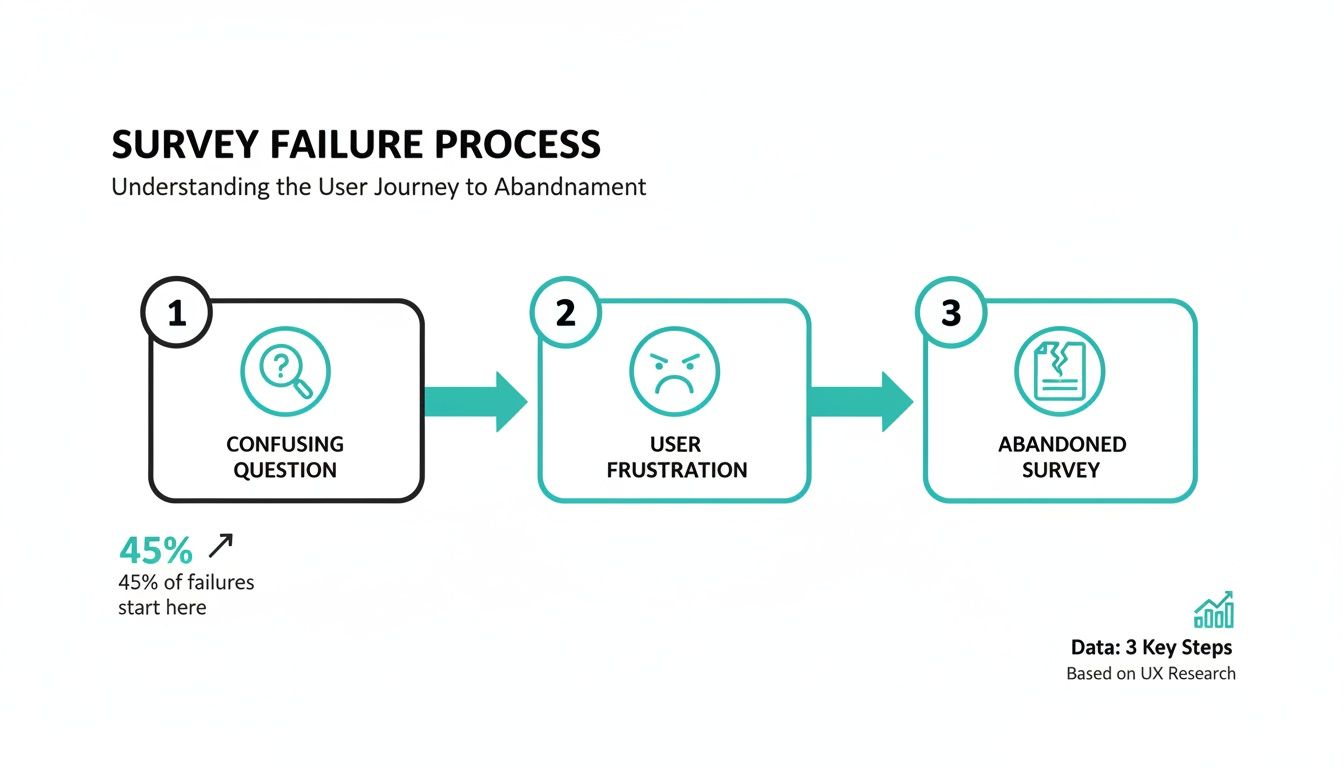
This whole mess often starts long before a respondent even sees the first question. It begins with a shaky strategy.
Break Down Your Goal Into Research Questions
With a solid primary objective in hand, you can start breaking it down into smaller, more manageable research questions. These aren't the literal questions you'll ask people. Think of them as the key themes or areas you need to explore to achieve your main goal.
Let's stick with the product manager's objective: understanding pain points in a new dashboard. The research questions could look something like this:
- Which dashboard widgets do people use most and least often?
- What specific tasks are users trying to do when they run into trouble?
- How does the new dashboard experience stack up against their old workflow?
- Are we missing any key features that would make their jobs easier?
This list gives you a clear framework. Now, every single question you write for the survey has to tie back to one of these core themes. If a question doesn't help answer one of them, it gets cut. It’s really that simple.
A well-defined objective acts as a filter. It gives you the confidence to axe any question that doesn’t directly serve your end goal, leading to a shorter, more focused, and much more effective survey.
This discipline is what separates a professional survey from an amateur one. It prevents the dreaded "survey bloat," shows respect for your audience's time, and delivers the actionable insights you actually need, not just a bunch of noise.
Mastering Question Wording and Structure
You’ve set your survey goals, which is a fantastic start. But now comes the part where the rubber really meets the road: crafting the questions themselves. This is where the art and science of survey design truly collide. Writing questions that are impossible to misinterpret is probably the single most important skill for gathering clean, reliable data.
The whole point is to make sure every single person understands a question in the exact same way you do. Even a tiny bit of confusion can poison your data and send you down the wrong path.

Speak Plain English: Keep It Simple and Direct
The best survey questions feel effortless to answer. To get there, you have to ruthlessly prioritize clarity. Ditch the corporate jargon, overly complex sentences, and technical acronyms unless you're 100% certain your audience lives and breathes that language every day.
A great rule of thumb I’ve always followed is to write for a 12-year-old’s reading level. This isn't about "dumbing down" your survey; it's about making sure it's accessible to everyone, regardless of their background.
Just look at the difference:
- Jargon-filled: "What are your perceptions regarding the synergistic value proposition of our new user interface?"
- Simple & Direct: "What do you think of our new design?"
The second one gets you the exact same information without making your respondent feel like they need a dictionary to help you.
Watch Out for Leading and Loaded Questions
One of the fastest ways to get garbage data is to ask questions that subtly nudge people toward a certain answer. These biased questions usually show up in two sneaky forms: leading and loaded.
A leading question basically hints at the answer you want.
- Bad: "Don't you agree that our customer support team is more helpful than ever?"
- Better: "How would you rate the helpfulness of our customer support team?"
A loaded question is built on an assumption that might not be true.
- Bad: "Where do you enjoy drinking beer?" (This assumes the person drinks beer in the first place.)
- Better: This needs to be a two-step process. First, ask a filter question like, "Do you drink beer?" If they say yes, then you can ask, "Where do you typically drink beer?"
Always read your questions out loud and ask yourself if they're truly neutral. You're after genuine opinions, not just confirmation of what you already believe. It's also worth remembering that this principle is crucial for any method of collecting feedback effectively, not just formal surveys.
Spot and Split Those “Double-Barreled” Questions
This is a classic rookie mistake. A "double-barreled" question tries to ask two things at once, which creates a huge mess for both the respondent and your data.
Imagine you ask: "How satisfied are you with our product's performance and price?"
What if your customer loves the performance but thinks the price is way too high? They can't answer accurately. Any answer they give is a half-truth, leaving you with data you can’t actually use.
The fix is incredibly simple: split it into two separate questions.
- How satisfied are you with our product's performance?
- How satisfied are you with our product's price?
Boom. Now you get a crystal-clear signal on two distinct aspects of your product. A pro tip is to always scan your draft for the word "and"—it’s a common red flag that a question might be double-barreled.
A survey question should be like a spotlight, illuminating one single idea at a time. When you try to shine it on two things at once, you end up with shadows and unclear results.
To drive this home, here are a few common wording traps I see all the time and how to sidestep them.
Common Wording Mistakes and How to Fix Them
This table gives you a side-by-side look at some common phrasing problems and their much-improved versions.
| Mistake to Avoid | Poor Question Example | Effective Question Example |
|---|---|---|
| Ambiguous Terms | "Do you exercise regularly?" | "How many days per week, on average, do you exercise for at least 30 minutes?" |
| Leading Phrasing | "Most experts agree our new feature is a game-changer. How much do you like it?" | "How would you describe your experience with our new feature?" |
| Double-Barreled | "Was our checkout process fast and easy?" | "How would you rate the speed of our checkout process?" AND "How would you rate the ease of use of our checkout process?" |
A small change in wording can make a world of difference in the quality of the answers you receive.
Think Like a Storyteller: The Psychology of Question Order
The order you ask your questions in can dramatically affect your results. A good, logical flow feels like a natural conversation, guiding the user along without causing confusion or fatigue. A bad flow is jarring and a surefire way to get people to abandon your survey.
Here are a few time-tested principles for getting the flow right:
- Start broad and easy: Kick things off with general, simple questions to get them warmed up. Don't hit them with the heavy stuff right out of the gate.
- Group related topics: Keep all your questions about customer service in one block, and all your questions about product features in another. This creates a sense of organization and helps the respondent stay focused.
- Save sensitive questions for last: Ask for demographics (age, income) or other personal details at the very end. By that point, you've built a bit of trust, and they're more likely to share.
- Use natural transitions: When you need to switch gears, signal it clearly. A simple phrase like, "Great. Now, let’s talk a little about your experience with our website," works wonders.
By putting some thought into the journey you're creating, you show respect for your respondent's time and mental energy. This small effort can pay huge dividends in the quality and completeness of the data you get back in 2026.
Choosing the Right Question Types for Better Data
The words you use in a survey are half the battle; the format you put them in is the other half. Getting the question type right makes it a breeze for people to give you clear, honest answers. Get it wrong, and you’ll end up with a confusing mess of unusable data. Think of question types as different tools in your research kit—you wouldn't use a hammer to turn a screw.
Your choice here should always point back to the survey goals you set earlier. Are you trying to measure customer sentiment on a neat, tidy scale? Or are you digging for new ideas and unexpected "aha!" moments? Your objective will tell you which tool to grab.

Uncovering the "Why" with Open-Ended Questions
When you need the rich, juicy details behind an answer, open-ended questions are your best friend. They don’t box people into pre-set choices, instead letting them respond in their own words.
These are perfect for exploratory research, asking follow-up questions, or capturing incredible quotes and testimonials. For example, a simple "Is there anything else you'd like to share about your experience today?" can unearth pain points or moments of pure delight you never would have thought to ask about.
The trade-off? The data is unstructured, and sifting through it all can be a major time sink. If you’re going this route, you need a plan. Learning and mastering qualitative research analysis methods is non-negotiable for turning all that text into meaningful insights.
Getting Structured Data with Closed-Ended Questions
Closed-ended questions give respondents a specific list of answers to choose from. This format is the workhorse of most surveys for a reason: it produces clean, quantitative data that’s simple to analyze and benchmark over time.
You’ve got a few common types, each with a specific job:
- Multiple-Choice: The classic. They're great for clear-cut options where you want a single answer (like a "yes/no") or multiple selections (e.g., "Which of our features did you use this week? Check all that apply.").
- Rating Scales: Essential for measuring feelings, opinions, and satisfaction. This is where you find Likert scales ("Strongly Disagree" to "Strongly Agree") and numerical scales ("On a scale of 1 to 10...").
- Demographic Questions: These are all about collecting basic info on your audience—age, location, job title—using predefined categories. For a deep dive into crafting these, check out these great survey question examples.
The golden rule here is to make sure your answer options cover all the bases and don't overlap. When in doubt, always include an "Other (please specify)" option. It’s your safety net.
Designing Effective Rating Scales
Rating scales are incredibly powerful, but boy, are they easy to mess up. The two biggest debates I see are about how many points to use and whether to include a neutral middle option.
For a standard Likert scale, a 5-point scale is usually the sweet spot. It gives people enough nuance to express themselves without causing analysis paralysis. A 7-point scale can offer a bit more detail for deeper academic or psychological studies, but anything more than that often just adds noise.
A quick word on the neutral option: It’s crucial. Including a "Neither agree nor disagree" choice lets people who genuinely don't have an opinion answer honestly. Forcing them to pick a side when they're on the fence will absolutely skew your results.
On the other hand, for something like a Net Promoter Score (NPS) survey, the scale is always 0 to 10. That's the standardized methodology. If you change it, you can't compare your score to any industry benchmarks, which defeats the whole purpose.
Your question format has a direct, measurable impact on data quality. Vague phrasing is a top offender; research from Pew warns it can inflate errors by a whopping 30%. This is why specific language like "How often do you..." is so much better than a generic "Do you...?".
This ties directly into the respondent's experience. When people actually enjoy taking a survey, the data quality goes up. Studies have shown that when respondents feel the survey is valuable and enjoyable, response rates can improve by 20-30%. By using clear question types and well-designed scales, you can boost this enjoyment factor by 25-40%, turning a chore into a conversation.
Ultimately, by carefully picking your question types to match your 2026 research goals, you’re not just making the survey easier to answer—you're guaranteeing you get the precise, clean data you need to make smart decisions.
Using Logic to Create a Conversational Flow
Let’s be honest: nobody enjoys filling out a long, clunky form where half the questions don't even apply to them. Static, one-size-fits-all surveys are a relic. To get high-quality data in 2026, your survey needs to feel like a personal conversation that respects the user's time.
The secret to this is branching logic, sometimes called skip logic. It’s a simple but powerful idea: the survey changes in real-time based on how someone answers. People only see questions that are relevant to them, making the whole thing feel less like an interrogation and more like a chat.
What Branching Logic Looks Like in Practice
Imagine you're sending out a customer satisfaction survey. A basic form asks everyone the same things, whether they loved your product or hated it. With branching logic, the survey intelligently adapts.
A customer who rates their experience a perfect "10/10" could automatically jump to a question asking for a glowing testimonial. Meanwhile, someone who gives a "3/10" gets a different follow-up: "We're sorry to hear that. Could you tell us more about what went wrong?"
This isn't just a neat trick; it's about efficiency. You get the specific, actionable insights you need from your biggest fans and your harshest critics, all without making everyone else wade through irrelevant questions. It's a cornerstone of effective conversational design.
Why a Conversational Flow Is a Game-Changer
Building this kind of logic into your survey does more than just make it shorter. It completely changes the user experience, making it feel more intuitive and engaging. When a survey seems to be listening and reacting, people are much more likely to stick around and give you honest, detailed answers.
This is especially true when you’re trying to dig for detailed feedback. Research shows that interactive follow-up questions can slash non-response rates for specific questions by up to 47% across different global markets. Even something as simple as a well-timed "Can you tell us more?" prompt can keep people from dropping off. It’s a huge advantage, especially when you consider that traditional phone survey response rates have cratered below 20%. You can explore the full research on interactive survey requests to see just how effective this is.
A smart survey should never ask a question when it already knows the answer is irrelevant. Using logic is the single best way to show your audience that you value their time and attention.
Common Scenarios Where Logic Shines
You can use branching logic in countless ways, but here are a few classic examples where it's absolutely essential for writing great survey questions.
- Product Feedback: If someone tells you they’ve never used a certain feature, logic prevents you from immediately asking ten follow-up questions about their satisfaction with it.
- Event Registration: First, ask attendees if they have dietary restrictions. Only the people who say "yes" will see the next question asking for the specifics.
- Job Applications: A simple screening question like, "Do you have at least three years of experience in this role?" can work wonders. If a candidate says "no," you can gently guide them to a message explaining they don’t meet the minimum qualifications, saving time for both them and your hiring team.
When you start building these intelligent pathways, your form stops being a boring document and becomes a dynamic tool for gathering better information.
How to Test and Refine Your Survey Before Launch
You’ve designed the logic and polished every question. It feels like you're done, but hitting "launch" right now is one of the biggest mistakes you can make. The final, most crucial step is a full-scale test drive. Skipping this part almost guarantees you’ll end up with skewed data, which wastes all the effort you’ve put in so far.
Think of it as a pre-flight check. A careful review makes sure every single component of your survey works just as you planned.
Your first review should be simple: a thorough proofread. I find it helps to read every single word out loud—questions, instructions, even the button text. You’ll catch awkward phrases, typos, and grammatical errors that your eyes just skim over when reading silently. These little mistakes can feel unprofessional and erode a respondent's trust right from the start.
After that, you need to get technical. If you’ve built in any kind of branching or conditional logic, it's time to try and break it. Run through the survey multiple times, purposely choosing different combinations of answers. Does the logic flow correctly? Are you seeing only the questions you're supposed to? The last thing you want is for a respondent to hit a dead end or get stuck in a loop.
Conduct a Pilot Test with a Real Audience
Once you’ve personally vetted the survey, it's time to see how it performs in the wild. This is where a pilot test comes in. You'll share the survey with a small, select group—think 5 to 10 people—who are a good representation of your actual target audience. They’ll bring a fresh perspective and will almost certainly spot issues you've become blind to.
This isn’t just a glorified spell-check. You're testing the entire experience from the user's point of view.
The real goal of a pilot test is to find the friction. You need to understand not just if people can finish your survey, but what it feels like to take it. Is it confusing? Does it drag on? Do any questions make them uncomfortable?
When you reach out to your test group, don't just ask for a generic thumbs-up. To get feedback you can actually use, you need to ask pointed questions.
Here’s what I typically ask my pilot testers:
- Were there any questions that were confusing or tough to understand?
- Did any of the questions feel too personal or awkward to answer honestly?
- Roughly how long did it take you to get from start to finish?
- Was there an answer option you were looking for that wasn't available?
- Did you run into any technical glitches, bugs, or weird formatting?
This kind of feedback is absolute gold. It gives you a clear roadmap for what to fix—whether it's tweaking the wording on a confusing question, adding a missing answer choice, or fixing a technical snag. Taking the time to do this final check before launching to hundreds (or thousands) of people in 2026 is what separates messy, unreliable data from the high-quality insights you’re after.
A Few Lingering Questions
You've got the plan and the know-how, but a few practical questions always seem to surface right as you're about to launch. Let's tackle some of the most common ones I hear from people so you can finalize your survey with confidence.
How Long Is Too Long?
There's no single magic number, but experience shows that the sweet spot is a survey someone can finish in 5-10 minutes. Any longer, and you'll see a sharp drop-off in completion rates.
The best way to hit that target is to be absolutely ruthless in your editing. Go through your list and ask, "Is this question essential to my primary goal?" If it's just a "nice to have," cut it. For more complex topics, it's often better to split your research into a couple of shorter, more focused surveys.
Should Every Question Be Required?
Definitely not. Be very selective with that "required" toggle. A question should only be mandatory if your entire analysis hinges on that specific piece of data.
Making too many questions required is one of the fastest ways to get someone to abandon your survey, especially if the questions are sensitive or feel irrelevant to them. A good rule of thumb is to only require the absolute must-haves—like a core qualifying question—and leave the rest optional. Just make sure you clearly mark which ones are required. It’s a simple way to respect the respondent's time and choice in 2026.
A leading question subtly nudges a respondent toward your preferred answer. A loaded question buries an unproven assumption within its phrasing, forcing an answer that confirms it.
What's the Real Difference Between Leading and Loaded Questions?
It's easy to confuse these two, but the distinction is important for keeping your data clean. They both introduce bias, just in different ways.
A leading question is like a little nudge from you, the creator. It steers the respondent toward the answer you want to hear.
- Example: "How amazing was our customer support team today?"
A loaded question, on the other hand, is built on a hidden assumption that the respondent may not even agree with.
- Example: "What do you plan to buy with the money you're saving by using our software?" (This assumes they are saving money).
Both are bad news for data quality. The goal is always to stay neutral and let people give you their honest, uninfluenced thoughts.
Ready to stop building boring forms and start having engaging conversations? With Formbot, you can use AI to generate effective surveys in seconds, complete with a modern, one-question-at-a-time flow that boosts completion rates. Start building smarter forms today at https://tryformbot.com.



